
原因
uniapp小程序受fetch影响,无法使用,环境限制,改用websocket
依赖
<dependency>
    <groupId>org.springframework.boot</groupId>
    <artifactId>spring-boot-starter-websocket</artifactId>
</dependency>
java接口
WebSocketConfig配置
import org.springframework.context.annotation.Configuration;
import org.springframework.web.socket.config.annotation.EnableWebSocket;
import org.springframework.web.socket.config.annotation.WebSocketConfigurer;
import org.springframework.web.socket.config.annotation.WebSocketHandlerRegistry;

@Configuration
@EnableWebSocket
public class WebSocketConfig implements WebSocketConfigurer {

    private final AiWebSocketHandler aiWebSocketHandler;

    public WebSocketConfig(AiWebSocketHandler aiWebSocketHandler) {
        this.aiWebSocketHandler = aiWebSocketHandler;
    }

    @Override
    public void registerWebSocketHandlers(WebSocketHandlerRegistry registry) {
        registry.addHandler(aiWebSocketHandler, "/ai/stream-ws")
                .setAllowedOrigins("*"); // 生产环境应限制 origin
    }
}
调用ai实现
import com.fan.model.paiRecord.PaiRecordService;
import com.fasterxml.jackson.databind.JsonNode;
import com.fasterxml.jackson.databind.ObjectMapper;
import com.fan.entity.PaiRecord;
import jakarta.annotation.Resource;
import lombok.extern.slf4j.Slf4j;
import org.springframework.stereotype.Component;
import org.springframework.web.socket.CloseStatus;
import org.springframework.web.socket.TextMessage;
import org.springframework.web.socket.WebSocketMessage;
import org.springframework.web.socket.WebSocketSession;
import org.springframework.web.socket.handler.TextWebSocketHandler;
import reactor.core.scheduler.Schedulers;

import java.nio.charset.StandardCharsets;
import java.util.Date;
import java.util.Map;
import java.util.concurrent.CompletableFuture;
import java.util.concurrent.Executors;

@Slf4j
@Component
public class AiWebSocketHandler extends TextWebSocketHandler {

    private static final String API_ENDPOINT = "https://dashscope.aliyuncs.com/compatible-mode/v1/chat/completions";
    private static final String API_KEY = "xxxxxxxxxxxxx";
    private static final ObjectMapper objectMapper = new ObjectMapper();

    @Resource
    private PaiRecordService paiRecordService;

    @Override
    public void afterConnectionEstablished(WebSocketSession session) throws Exception {
        log.info("🟢 WebSocket 连接已建立 - Session ID: {}, Remote Address: {}",
                session.getId(), session.getRemoteAddress());
        super.afterConnectionEstablished(session);
    }

    @Override
    public void handleMessage(WebSocketSession session, WebSocketMessage<?> message) throws Exception {
        log.debug("📥 收到客户端消息 - Session ID: {}, Message: {}", session.getId(), message.getPayload());
        super.handleMessage(session, message);
    }

    @Override
    public void afterConnectionClosed(WebSocketSession session, CloseStatus status) throws Exception {
        log.info("🔴 WebSocket 连接已关闭 - Session ID: {}, Reason: {} (Code: {})",
                session.getId(),
                status.getReason(),
                status.getCode());
        super.afterConnectionClosed(session, status);
    }

    @Override
    protected void handleTextMessage(WebSocketSession session, TextMessage message) throws Exception {
        String payload = message.getPayload();
        // 假设前端发送的是 JSON: { "id": "2008925332902686722" }
        JsonNode jsonNode = objectMapper.readTree(payload);
        String idStr = jsonNode.path("id").asText();

        if (idStr == null || idStr.trim().isEmpty()) {
            session.sendMessage(new TextMessage("{\"error\":\"id 不能为空\"}"));
            session.close();
            return;
        }

        PaiRecord record = paiRecordService.getById(idStr);
        if (record == null) {
            session.sendMessage(new TextMessage("{\"error\":\"记录不存在\"}"));
            session.close();
            return;
        }

        // 如果已有缓存,直接返回
        if (record.getAiStr() != null) {
            session.sendMessage(new TextMessage(record.getAiStr()));
            session.sendMessage(new TextMessage("[DONE]"));
            session.close();
            return;
        }

        // 启动流式请求
        streamAndPush(session, record, idStr);
    }

    private void streamAndPush(WebSocketSession session, PaiRecord record, String idStr) {
        StringBuilder fullResponse = new StringBuilder();
        String liuBody = record.getLiuBody();
        String userMessage = liuBody + "\n根据专业解卦思维来分析此卦...(你的 prompt)";

        // 构建 DashScope 请求体
        Map<String, Object> systemMsg = Map.of("role", "system", "content",
                "请用纯文本回答,不要使用任何 Markdown、HTML 或富文本格式。");

        Map<String, Object> userMsg = Map.of("role", "user", "content", userMessage);
        java.util.List<Map<String, Object>> messages = java.util.List.of(systemMsg, userMsg);

        Map<String, Object> requestBody = Map.of(
                "model", "qwen-plus",
                "messages", messages,
                "stream", true,
                "stream_options", Map.of("include_usage", true)
        );

        // 使用 WebClient 发起流式请求
        var client = org.springframework.web.reactive.function.client.WebClient.builder()
                .baseUrl(API_ENDPOINT)
                .defaultHeader("Authorization", "Bearer " + API_KEY)
                .defaultHeader("Content-Type", "application/json")
                .build();

        var responseFlux = client.post()
                .bodyValue(requestBody)
                .accept(org.springframework.http.MediaType.TEXT_EVENT_STREAM)
                .retrieve()
                .bodyToFlux(org.springframework.core.io.buffer.DataBuffer.class);

        responseFlux
                .publishOn(Schedulers.boundedElastic())
                .subscribe(
                        dataBuffer -> {
                            try {
                                String chunk = dataBuffer.toString(StandardCharsets.UTF_8);
                                org.springframework.core.io.buffer.DataBufferUtils.release(dataBuffer);

                                // 解析 SSE 格式
                                String[] lines = chunk.split("\n");
                                for (String line : lines) {
                                    if (line.startsWith("data: ")) {
                                        String jsonData = line.substring(6).trim();
                                        if ("[DONE]".equals(jsonData)) {
                                            // 推送结束标记
                                            if (session.isOpen()) {
                                                session.sendMessage(new TextMessage("[DONE]"));
                                            }
                                            saveToDatabaseAsync(userMessage, fullResponse.toString(), idStr);
                                            return;
                                        }

                                        try {
                                            JsonNode root = objectMapper.readTree(jsonData);
                                            var choices = root.path("choices");
                                            if (choices.isArray() && !choices.isEmpty()) {
                                                var delta = choices.get(0).path("delta");
                                                if (delta.has("content")) {
                                                    String content = delta.get("content").asText();
                                                    fullResponse.append(content);
                                                    if (session.isOpen()) {
                                                        session.sendMessage(new TextMessage(content));
                                                    }
                                                }
                                            }
                                        } catch (Exception e) {
                                            // ignore parse error
                                        }
                                    }
                                }
                            } catch (Exception e) {
                                if (session.isOpen()) {
                                    try {
                                        session.sendMessage(new TextMessage("{\"error\":\"内部错误\"}"));
                                        session.close();
                                    } catch (Exception ignored) {}
                                }
                            }
                        },
                        error -> {
                            try {
                                if (session.isOpen()) {
                                    session.sendMessage(new TextMessage("{\"error\":\"流请求失败\"}"));
                                    session.close();
                                }
                            } catch (Exception ignored) {}
                        }
                );
    }

    private void saveToDatabaseAsync(String userMessage, String aiResponse, String idStr) {
        CompletableFuture.runAsync(() -> {
            try {
                PaiRecord record = paiRecordService.getById(idStr);
                if (record != null) {
                    record.setAiStr(aiResponse.trim());
                    record.setUpdateTime(new Date());
                    paiRecordService.updateById(record); // 确保你的 service 有 update 方法
                }
            } catch (Exception e) {
                System.err.println("保存失败: " + e.getMessage());
            }
        }, Executors.newCachedThreadPool());
    }
}
h5方式连接
<!DOCTYPE html>
<html lang="zh-CN">
<head>
  <meta charset="UTF-8" />
  <meta name="viewport" content="width=device-width, initial-scale=1.0"/>
  <title>AI 流式 WebSocket 测试</title>
  <style>
    body {
      font-family: Arial, sans-serif;
      padding: 20px;
      background: #f9f9f9;
    }
    #output {
      white-space: pre-wrap;
      word-break: break-word;
      background: white;
      padding: 16px;
      border-radius: 8px;
      border: 1px solid #ddd;
      min-height: 100px;
      margin-top: 10px;
    }
    button {
      padding: 8px 16px;
      font-size: 16px;
      cursor: pointer;
    }
    .status {
      margin-top: 10px;
      color: #555;
    }
  </style>
</head>
<body>
  <h2>AI 流式响应测试(WebSocket)</h2>
  <button id="connectBtn">开始连接并请求 AI</button>
  <div class="status">状态: <span id="status">未连接</span></div>
  <div id="output"></div>

  <script>
    const output = document.getElementById('output');
    const statusEl = document.getElementById('status');
    const connectBtn = document.getElementById('connectBtn');

    let socket = null;

    // 替换为你的实际域名(必须是 HTTPS + WSS)
    // const WS_URL = 'wss://your-domain.com/ai/stream-ws';
    // 如果本地测试(且后端支持),可用:
    const WS_URL = 'wss://xishangkeji.com/liuyao/ai/stream-ws';

    const TEST_ID = "2008925332902686722"; // 替换为你的真实 ID

    function updateStatus(text) {
      statusEl.textContent = text;
    }

    function appendText(text) {
      output.textContent += text;
      // 自动滚动到底部
      output.scrollTop = output.scrollHeight;
    }

    connectBtn.addEventListener('click', () => {
      if (socket && socket.readyState === WebSocket.OPEN) {
        alert('已连接,请先刷新页面');
        return;
      }

      output.textContent = '';
      updateStatus('正在连接...');

      socket = new WebSocket(WS_URL);

      socket.onopen = () => {
        updateStatus('已连接,正在发送请求...');
        socket.send(JSON.stringify({ id: TEST_ID }));
      };

      socket.onmessage = (event) => {
        const data = event.data;

        if (data === '[DONE]') {
          updateStatus('✅ 流结束');
          console.log('流结束');
          return;
        }

        if (typeof data === 'string' && data.startsWith('{"error":')) {
          try {
            const err = JSON.parse(data);
            updateStatus(`❌ 错误: ${err.error}`);
          } catch {
            updateStatus('❌ 返回错误格式');
          }
          return;
        }

        // 正常内容片段
        appendText(data);
      };

      socket.onerror = (error) => {
        updateStatus('❌ 连接出错');
        console.error('WebSocket 错误:', error);
      };

      socket.onclose = () => {
        updateStatus('🔌 连接已关闭');
      };
    });
  </script>
</body>
</html>
uniapp方式连接
<template>
  <scroll-view class="org-container" scroll-y enhanced :show-scrollbar="false">
    <!-- 如果样式设置在全局,不需要背景的不使用class="com-container" -->
    <view class="com-container">
      <!-- placeholder:固定在顶部时,是否生成一个等高元素,以防止塌陷 -->
      <up-navbar title="" :placeholder="true" leftIcon="" leftText="我的">
      </up-navbar>


      <!--  <view>
        <web-view :fullscreen="false" :update-title="false" src="http://127.0.0.1:5500/ai.html"></web-view>
      </view> -->

      <view>
        <text>{{ content }}</text>
      </view>

    </view>
    <up-toast ref="uToastRef"></up-toast>
  </scroll-view>
</template>

<script setup>
  import {
    ref,
    onMounted,
    onUnmounted
  } from 'vue';
  import {
    onLoad,
    onUnload
  } from '@dcloudio/uni-app';

  const content = ref('');

  let socketTask = null; // 用于保存连接任务(可选)

  onLoad(() => {
    // 检查平台
    const platform = uni.getSystemInfoSync().platform

    // uni-app中的WebSocket需要特别注意以下几点:

    // 1. 确保在合法域名列表中(小程序需要配置)
    // 2. 使用完整的URL(包括协议)
    const wsUrl = 'wss://xishangkeji.com/liuyao/ai/stream-ws'

    console.log('当前平台:', platform)
    console.log('连接URL:', wsUrl)

    // 建立连接
    socketTask = uni.connectSocket({
      url: wsUrl,
      complete: (res) => {
        console.log('connectSocket complete:', res)
      }
    })

    // 注意:uni-app中需要确保socketTask不为null再添加事件监听
    if (socketTask) {
      socketTask.onOpen((res) => {
        console.log('WebSocket连接已打开', res)
        // 发送请求
        socketTask.send({
          data: JSON.stringify({
            id: "2008925332902686722"
          }),
          success: () => {
            console.log('消息发送成功')
          },
          fail: (err) => {
            console.error('发送消息失败', err)
          }
        })
      })

      socketTask.onMessage((res) => {
        console.log('收到消息:', res.data)
        // ... 处理消息
        content.value += res.data
      })

      socketTask.onError((err) => {
        console.error('WebSocket错误:', err)
      })

      socketTask.onClose((res) => {
        console.log('WebSocket已关闭:', res)
      })
    }
  })
</script>

<style lang="scss">
  // 背景图片
  $container-bg-url: 'https://xs-face.oss-cn-shanghai.aliyuncs.com/202601/2008440539537674241_61252.png';

  .com-container {
    background: url($container-bg-url);
    width: 100%;
    min-height: 100vh;
    background-repeat: no-repeat;
    background-size: cover;
    background-attachment: fixed;
    box-sizing: border-box;
    padding: 16rpx 32rpx 24rpx 32rpx;

    // 导航栏默认背景替换
    .u-navbar--fixed {
      background: url($container-bg-url);
      background-repeat: no-repeat;
      background-size: cover;
      background-attachment: fixed;

      .u-navbar__content,
      .u-status-bar {
        background-color: transparent !important;
      }
    }
  }
</style>
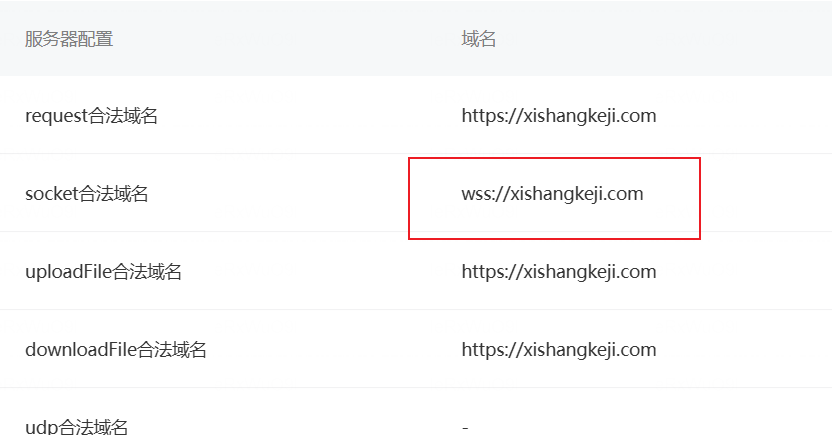
公众平台配置wss
nginx配置
location /liuyao {
    proxy_pass http://localhost:10999;
    rewrite ^/liuyao/(.*) /$1 break;
    proxy_http_version 1.1;                         # 重要
    proxy_set_header Upgrade $http_upgrade;         # 重要
    proxy_set_header Connection "upgrade";          # 重要
}