
方案概述
算法体系
| 算法 | 用途 | 前端库 | 后端库 |
|---|---|---|---|
| SM2 | 非对称加密,传输 SM4 密钥 | sm-crypto@0.4.0 | BouncyCastle |
| SM4/CBC | 对称加密,加密请求体/响应体 | sm-crypto@0.4.0 | BouncyCastle |
| SM3 | 哈希签名,防篡改+抗重放 | sm-crypto@0.4.0 | BouncyCastle |
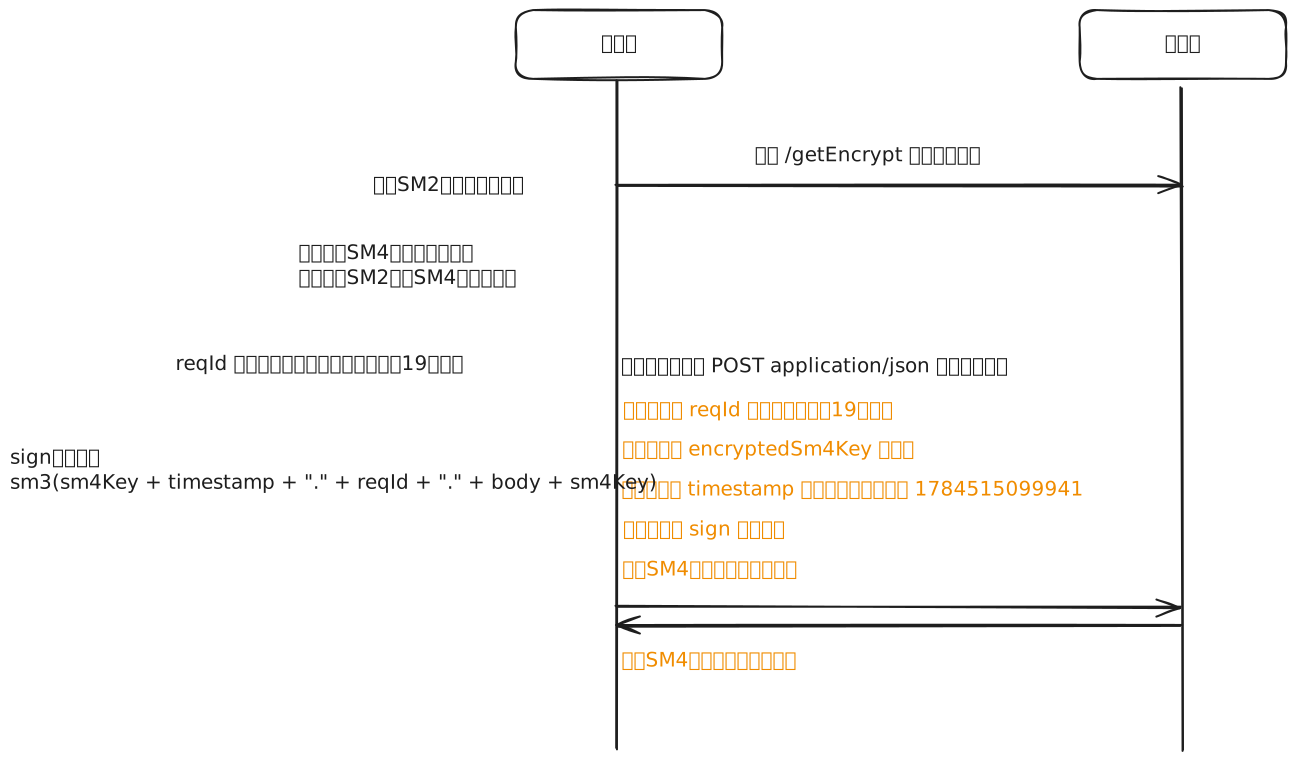
完整交互流程
┌─ 前端 ───────────────────────────────────── 后端 ─┐
│                                                   │
│ ① GET /getEncrypt ───────────────→ 返回 SM2 公钥  │
│ ② 生成随机 SM4 密钥                                │
│ ③ SM2 加密 SM4 密钥 → encryptedSm4Key              │
│                                                   │
│ ④ 业务请求:                                        │
│   body = SM4_CBC_Encrypt(json, sm4Key)             │
│   sign = SM3(sm4Key + ts + "." + reqId + "."       │
│              + body + sm4Key)                       │
│   Headers: reqId, encryptedSm4Key, ts, sign        │
│   Body: IV(16B) + SM4密文                          │
│                         ──────────→                │
│                                   ⑤ SM2解密得sm4Key│
│                                   ⑥ ts偏差>5min?   │
│                                   ⑦ nonce已存在?   │
│                                   ⑧ SM3验签        │
│                                   ⑨ SM4解密body     │
│                                   ⑩ 执行业务        │
│                                   ⑪ SM4加密响应     │
│                                   ⑫ SM3签名响应     │
│                         ←──────────                │
│ ⑬ SM3验签响应                                      │
│ ⑭ SM4解密响应                                      │
│                                                   │
└───────────────────────────────────────────────────┘
安全特性
| 特性 | 实现方式 |
|---|---|
| 机密性 | SM4/CBC 随机 IV,每次加密结果不同 |
| 完整性 | SM3 带盐签名,密钥仅加密通道内 |
| 抗重放 | timestamp ±2min + nonce(sign) Redis 去重 |
| 防刷 | 同一 reqId+URI 1秒内只放行一次 |
前端实现
依赖
npm install sm-crypto@0.4.0架构分层
GmCrypto.js           ← 纯算法层(零业务依赖)
    ↑ 唯一引用
cryptoService.js      ← 服务层(init / encryptRequest / decryptResponse / verifyResponse)
    ↑
http.js  +  App.vue   ← 网络层 + 应用层
store/index.js        ← 密钥持久化(sessionStorage)
迁移时只需复制 GmCrypto.js + cryptoService.js,store 加对应字段即可。
GmCrypto.js
纯算法工具,src/util/GmCrypto.js
import { sm2, sm4, sm3 } from 'sm-crypto'

// ==================== SM3 签名 ====================

/**
 * 请求签名: sm3(sm4Key + timestamp + "." + reqId + "." + body + sm4Key)
 * 带盐 SM3,密钥仅在加密通道内,非标准 HMAC 但同等安全
 */
export function sm3SignRequest(keyHex, timestamp, reqId, body) {
  const signStr = timestamp + '.' + reqId + '.' + body
  return sm3(keyHex + signStr + keyHex)
}

export function sm3VerifyRequest(keyHex, timestamp, reqId, body, sign) {
  return sm3SignRequest(keyHex, timestamp, reqId, body) === sign
}

// ==================== SM2 ====================

/**
 * SM2 加密
 * @param {string} plainText  明文字符串
 * @param {string} publicKey  十六进制公钥 (04 + 128 hex, 共130字符)
 * @param {number} cipherMode 1=C1C3C2(默认), 0=C1C2C3
 * @returns {string} 十六进制密文 (含 04 前缀,兼容 BouncyCastle)
 */
export function sm2Encrypt(plainText, publicKey, cipherMode = 1) {
  try {
    // sm-crypto 0.4.0 的 doEncrypt 会去掉 C1 的 04 前缀
    // BouncyCastle 需要完整编码,这里补回来
    return '04' + sm2.doEncrypt(plainText, publicKey, cipherMode)
  } catch (error) {
    console.error('SM2 加密失败:', error)
    throw new Error('SM2 加密失败: ' + error.message)
  }
}

export function sm2Decrypt(cipherText, privateKey, cipherMode = 1) {
  try {
    const data = cipherText.startsWith('04') ? cipherText.substring(2) : cipherText
    return sm2.doDecrypt(data, privateKey, cipherMode)
  } catch (error) {
    console.error('SM2 解密失败:', error)
    throw new Error('SM2 解密失败: ' + error.message)
  }
}

// ==================== SM4 ====================

export function generateSm4Key() {
  const chars = '0123456789abcdef'
  let result = ''
  for (let i = 0; i < 32; i++) {
    result += chars[Math.floor(Math.random() * 16)]
  }
  return result
}

function generateIv() {
  const bytes = new Uint8Array(16)
  crypto.getRandomValues(bytes)
  let hex = ''
  for (let i = 0; i < 16; i++) {
    hex += bytes[i].toString(16).padStart(2, '0')
  }
  return hex
}

/**
 * SM4 加密(CBC 模式,随机 IV 前置)
 * 格式:IV(16字节) + 密文 → 十六进制输出
 */
export function sm4Encrypt(plainText, keyHex) {
  try {
    const iv = generateIv()
    const cipherHex = sm4.encrypt(plainText, keyHex, { mode: 'cbc', iv })
    return iv + cipherHex
  } catch (error) {
    console.error('SM4 加密失败:', error)
    throw new Error('SM4 加密失败: ' + error.message)
  }
}

/**
 * SM4 解密(CBC 模式,从密文前 32 hex 提取 IV)
 */
export function sm4Decrypt(cipherHex, keyHex) {
  try {
    const iv = cipherHex.substring(0, 32)
    const data = cipherHex.substring(32)
    return sm4.decrypt(data, keyHex, { mode: 'cbc', iv })
  } catch (error) {
    console.error('SM4 解密失败:', error)
    throw new Error('SM4 解密失败: ' + error.message)
  }
}
关键点:sm-crypto 0.4.0 的
doEncrypt内部会去掉 C1 的04前缀(源码c1.substr(c1.length - 128)),BouncyCastle 期望完整编码。前端sm2Encrypt补回04。
cryptoService.js
服务层,src/util/cryptoService.js
import { sm2Encrypt, sm4Encrypt, sm4Decrypt, sm3SignRequest, sm3VerifyRequest, generateSm4Key } from './GmCrypto'
import { sysStore } from '../store'

let _ready = false
let _initPromise = null

/**
 * 初始化加密环境:获取 SM2 公钥 → 生成 SM4 密钥 → SM2 加密 SM4 密钥
 * 幂等,重复调用不会重新初始化
 */
export async function init(http) {
  const store = sysStore()
  if (store.sm2 && store.sm4) { _ready = true; return }
  if (_initPromise) return _initPromise

  _initPromise = (async () => {
    const res = await http.post('/getEncrypt', {})
    if (res.code !== 200) throw new Error('获取加密配置失败')
    store.sm2 = res.data.publicKey
    store.sm4 = generateSm4Key()
    store.sm4Encrypt = sm2Encrypt(store.sm4, store.sm2)
    _ready = true
  })()

  return _initPromise
}

/** 加密请求体 + 签名 */
export function encryptRequest(data) {
  const store = sysStore()
  const body = sm4Encrypt(JSON.stringify(data), store.sm4)
  const timestamp = Date.now().toString()
  const sign = sm3SignRequest(store.sm4, timestamp, store.deviceCode, body)
  return { body, timestamp, sign }
}

/** 请求头中的加密字段 */
export function getRequestHeaders() {
  const store = sysStore()
  return { reqId: store.deviceCode, encryptedSm4Key: store.sm4Encrypt }
}

/** 验证响应签名 */
export function verifyResponse(encryptedBody, timestamp, sign) {
  if (!timestamp || !sign) return true
  return sm3VerifyRequest(sysStore().sm4, timestamp, '', encryptedBody, sign)
}

/** 解密响应体 */
export function decryptResponse(encryptedBody) {
  return JSON.parse(sm4Decrypt(encryptedBody, sysStore().sm4))
}
http.js
axios 拦截器,src/api/http.js
import { encryptRequest, getRequestHeaders, decryptResponse, verifyResponse } from '../util/cryptoService'

// 请求拦截器
http.interceptors.request.use((config) => {
  const sysData = sysStore()
  config.headers['saToken'] = sysData.token

  // 加密 + 签名(跳过握手接口)
  if (config.method === 'post' && config.url !== '/getEncrypt') {
    const encrypted = encryptRequest(config.data)
    const headers = getRequestHeaders()
    config.headers['reqId'] = headers.reqId
    config.headers['encryptedSm4Key'] = headers.encryptedSm4Key
    config.headers['timestamp'] = encrypted.timestamp
    config.headers['sign'] = encrypted.sign
    config.data = encrypted.body
  }
  return config
})

// 响应拦截器
http.interceptors.response.use((response) => {
  // 解密 + 验签
  if (response.config.method === 'post' && response.config.url !== '/getEncrypt') {
    if (!verifyResponse(response.data, response.headers['timestamp'], response.headers['sign'])) {
      return Promise.reject(new Error('Invalid response sign'))
    }
    response.data = decryptResponse(response.data)
  }
  // 业务状态码处理...
  return response.data
})
App.vue
初始化入口
import http from './api/http'
import { init as initCrypto } from './util/cryptoService'

;(async function () {
  await initCrypto(http)
  console.log('系统初始化完成')
})()
store/index.js
密钥存储
state: () => ({
  sm2: '',         // 服务端 SM2 公钥
  sm4: '',         // 客户端 SM4 密钥(hex)
  sm4Encrypt: '',  // SM2 加密后的 SM4 密钥
  deviceCode: ''   // 设备标识(每次请求携带)
}),
persist: { enabled: true, storage: sessionStorage }
后端实现
依赖
<!-- SM2密码工具类 -->
<dependency>
    <groupId>org.bouncycastle</groupId>
    <artifactId>bcpkix-jdk18on</artifactId>
    <version>1.84</version>
</dependency>
<!-- SM3密码工具类 -->
<dependency>
    <groupId>org.bouncycastle</groupId>
    <artifactId>bcprov-jdk18on</artifactId>
    <version>1.84</version>
</dependency>
Sm2Util.java
com.project.util.sm.Sm2Util
- 生成 SM2 密钥对:
generateKeyPair() - 加密:
encrypt(plainText, publicKeyHex)— C1C3C2 模式 - 解密:
decrypt(cipherTextHex, privateKeyHex) - 签名/验签:
sign()/verify()
关键参数:SM2 推荐曲线(国密标准),SM2Engine.Mode.C1C3C2
Sm4Util.java
com.project.util.sm.Sm4Util
- CBC 模式,每次加密生成随机 16 字节 IV
- 密文格式:IV(16B) + 密文,十六进制输出
- PKCS7 填充
// 加密:随机 IV → CBC 加密 → IV + 密文 拼接
public static String encrypt(String plainText, String keyHex) {
    byte[] key = Hex.decode(keyHex);
    byte[] iv = new byte[BLOCK_SIZE];
    new SecureRandom().nextBytes(iv);
    byte[] cipherBytes = sm4CbcEncrypt(plainText.getBytes(UTF_8), key, iv);
    byte[] result = new byte[iv.length + cipherBytes.length];
    System.arraycopy(iv, 0, result, 0, iv.length);
    System.arraycopy(cipherBytes, 0, result, iv.length, cipherBytes.length);
    return Hex.toHexString(result);
}

// 解密:提取前16字节IV → CBC 解密 → UTF-8 还原
public static String decrypt(String cipherTextHex, String keyHex) {
    byte[] fullData = Hex.decode(cipherTextHex);
    byte[] iv = Arrays.copyOfRange(fullData, 0, BLOCK_SIZE);
    byte[] cipherBytes = Arrays.copyOfRange(fullData, BLOCK_SIZE, fullData.length);
    byte[] plainBytes = sm4CbcDecrypt(cipherBytes, Hex.decode(keyHex), iv);
    return new String(plainBytes, UTF_8);
}
Sm3Util.java
com.project.util.sm.Sm3Util
public class Sm3Util {
    public static String hash(String data) {
        byte[] bytes = data.getBytes(StandardCharsets.UTF_8);
        SM3Digest digest = new SM3Digest();
        digest.update(bytes, 0, bytes.length);
        byte[] result = new byte[digest.getDigestSize()];
        digest.doFinal(result, 0);
        return Hex.toHexString(result);
    }

    /** 加签公式: sm3(sm4Key + timestamp + "." + reqId + "." + body + sm4Key) */
    public static String signRequest(String sm4Key, String timestamp, String reqId, String body) {
        return hash(sm4Key + timestamp + "." + reqId + "." + body + sm4Key);
    }

    public static boolean verifyRequest(String sm4Key, String timestamp, String reqId, String body, String sign) {
        return signRequest(sm4Key, timestamp, reqId, body).equals(sign);
    }
}
WrapperDataFilter.java
com.project.config.WrapperDataFilter
整个方案的核心过滤器,处理流程:
1. 白名单放行(/getEncrypt)
2. 仅处理 POST/PUT + application/json
3. 提取 reqId
4. Redis 获取缓存的 SM4 密钥(10分钟滑动过期)
   ↓ miss
5. 从 encryptedSm4Key 请求头 SM2 解密获取 SM4 密钥
6. 防重复提交(同一 reqId+URI,1秒内只放行一次)
7. 读取加密请求体
8. 签名校验:
   8.1 timestamp ±5分钟
   8.2 nonce 防重放
   8.3 SM3 签名比对
9. SM4 解密请求体
10. chain.doFilter 执行业务
11. SM4 加密响应体
12. SM3 签名响应 + timestamp
3.6 后端配置
application.yml:
sm2:
  publicKey: 04xxxx...  # SM2 公钥(130 hex)
  privateKey: xxxx...   # SM2 私钥(64 hex)
生成密钥对(运行 Sm2Util.main()):
私钥: 3b1c0d8f...  (64 hex)
公钥: 04a2f3c1...  (130 hex)
关键问题与解决
SM2 C1 编码兼容性(最坑)
| sm-crypto 0.4.0 | BouncyCastle | |
|---|---|---|
| C1 格式 | 去掉了 04 前缀(128 hex) |
期望完整编码(04 + 128 hex) |
解决:前端 sm2Encrypt 输出前补 '04'。
源码证据:sm-crypto doEncrypt 第 22 行 c1 = c1.substr(c1.length - 128)。
SM4 ECB vs CBC
- 后端
Sm4Util使用 CBC 模式 + 随机 IV(IV 前置在密文中) - 前端必须匹配:CBC 模式 + 随机 IV + IV 前置
握手接口不能加密
/getEncrypt 是获取 SM2 公钥的握手接口,此时 SM4 密钥尚未生成。前端拦截器和后端 Filter 都需要跳过此接口。
CORS 头丢失
Filter 中提前 return 时(如节流拦截),响应绕过了 Spring CORS Filter,浏览器拒绝读取 body。
解决:writeEncryptedError 方法中手动添加 CORS 头。
sm-crypto不支持Uint8Array密钥
sm-crypto 0.4.0 的 doEncrypt/doDecrypt 内部做 new BigInteger(hexString, 16),只接受 hex 字符串。
传入 Uint8Array 会被 toString 为 [object Uint8Array] 导致解析为 0。
迁移指南
前端迁移
- 复制
src/util/GmCrypto.js+src/util/cryptoService.js到新项目 npm install sm-crypto@0.4.0- store 添加字段:
sm2,sm4,sm4Encrypt,deviceCode - App.vue 启动时调用
initCrypto(http) - http.js 拦截器调用
encryptRequest()/decryptResponse()
后端迁移
- 添加 BouncyCastle 依赖
- 复制
Sm2Util.java、Sm3Util.java、Sm4Util.java - 复制
WrapperDataFilter.java并注册 Filter - 运行
Sm2Util.main()生成密钥对,配置到application.yml - 实现
WrapperRequest/WrapperResponse(请求体缓存包装类) - 添加
/getEncrypt接口返回 SM2 公钥 - 确保 Redis 可用(SM4 密钥缓存 + 签名 nonce)
后端代码
过滤器
import com.project.enumEntity.RedisKeyEnum;
import com.project.util.RedisSlidingExpirationUtil;
import com.project.util.sm.Sm2Util;
import com.project.util.sm.Sm3Util;
import com.project.util.sm.Sm4Util;
import jakarta.annotation.Resource;
import jakarta.servlet.*;
import jakarta.servlet.http.HttpServletRequest;
import jakarta.servlet.http.HttpServletResponse;
import lombok.extern.slf4j.Slf4j;
import org.springframework.beans.factory.annotation.Value;
import org.springframework.stereotype.Component;

import java.io.BufferedReader;
import java.io.IOException;
import java.nio.charset.StandardCharsets;
import java.util.*;
import java.util.concurrent.TimeUnit;

@Slf4j
@Component
public class WrapperDataFilter implements Filter {

    @Resource
    private RedisSlidingExpirationUtil redisSlidingExpirationUtil;

    @Value("${sm2.privateKey}")
    private String sm2PrivateKey;

    private static final int SESSION_KEY_TIMEOUT = 30;

    /**
     * 放行路径(不进行加解密)
     * 这些接口需要在加密握手之前被调用
     */
    private static final Set<String> WHITE_LIST = new HashSet<>(List.of(
            "/getEncrypt"          // 获取公钥
    ));

    @Override
    public void init(FilterConfig filterConfig) {
        log.info("国密过滤器初始化完成,放行路径: {}", WHITE_LIST);
    }

    @Override
    public void doFilter(ServletRequest request, ServletResponse response, FilterChain chain)
            throws IOException, ServletException {
        HttpServletRequest httpRequest = (HttpServletRequest) request;
        String uri = httpRequest.getRequestURI();
        String method = httpRequest.getMethod();

        // ============ 白名单放行 ============
        if (isWhiteListed(uri)) {
            log.debug("白名单路径放行: {}", uri);
            chain.doFilter(request, response);
            return;
        }

        log.debug("URI: {}, Method: {}, ContentType: {}", uri, method, httpRequest.getContentType());

        // ============ 只对 POST/PUT 且 application/json 处理 ============
        boolean shouldProcess = (Objects.equals("POST", method) || Objects.equals("PUT", method))
                && httpRequest.getContentType() != null
                && httpRequest.getContentType().contains("application/json");
        if (!shouldProcess) {
            chain.doFilter(request, response);
            return;
        }

        try {
            // ============ 获取会话标识 ============
            String reqId = httpRequest.getHeader("reqId");
            if (reqId == null || reqId.isEmpty()) {
                log.warn("缺少 reqId 请求头");
                ((HttpServletResponse) response).setStatus(HttpServletResponse.SC_BAD_REQUEST);
                response.getWriter().write("Missing reqId header");
                return;
            }
            log.debug("reqId: {}", reqId);

            // ============ 尝试从 Redis 缓存获取 SM4 会话密钥 ============
            String cacheKey = RedisKeyEnum.KEY_ADMIN_SESSION_CODE.value() + reqId;
            String sm4Key = redisSlidingExpirationUtil.getAndRefresh(cacheKey, SESSION_KEY_TIMEOUT, TimeUnit.MINUTES);

            if (Objects.isNull(sm4Key)) {
                // ============ 缓存不存在 → 从请求头解密获取 SM4 密钥 ============
                String encryptedSm4Key = httpRequest.getHeader("encryptedSm4Key");
                if (encryptedSm4Key == null || encryptedSm4Key.isEmpty()) {
                    log.warn("缺少 encryptedSm4Key 请求头,reqId: {}", reqId);
                    ((HttpServletResponse) response).setStatus(HttpServletResponse.SC_BAD_REQUEST);
                    response.getWriter().write("Missing encryptedSm4Key header");
                    return;
                }

                System.out.println("encryptedSm4Key: " + encryptedSm4Key);

                try {
                    sm4Key = Sm2Util.decrypt(encryptedSm4Key, sm2PrivateKey);
                } catch (Exception e) {
                    log.error("SM2 解密 SM4 密钥失败: {}", e.getMessage());
                    ((HttpServletResponse) response).setStatus(HttpServletResponse.SC_UNAUTHORIZED);
                    response.getWriter().write("Invalid encrypted key");
                    return;
                }

                log.debug("首次获取 SM4 密钥,reqId: {},密钥:{}", reqId, sm4Key);

                if (sm4Key.length() != 32) {
                    log.error("SM4 密钥长度错误: {}", sm4Key.length());
                    ((HttpServletResponse) response).setStatus(HttpServletResponse.SC_BAD_REQUEST);
                    response.getWriter().write("Invalid SM4 key");
                    return;
                }

                redisSlidingExpirationUtil.setWithSlidingExpire(cacheKey, sm4Key, SESSION_KEY_TIMEOUT, TimeUnit.MINUTES);
            }

            log.debug("SM4 密钥: {}", sm4Key);

            // ============ 防重复提交(同一 reqId+URI,1秒内只放行一次) ============
            String throttleKey = RedisKeyEnum.KEY_ADMIN_SESSION_CODE.value() + "throttle:" + reqId + ":" + uri;
            if (redisSlidingExpirationUtil.getValue(throttleKey) != null) {
                log.warn("重复请求拦截: reqId={}, uri={}", reqId, uri);
                writeEncryptedError(httpRequest, (HttpServletResponse) response, sm4Key);
                return;
            }
            redisSlidingExpirationUtil.setWithSlidingExpire(throttleKey, "1", 1, TimeUnit.SECONDS);

            // ============ 读取并解密请求体 ============
            String encryptedBody = getRequestBody(httpRequest);
            if (encryptedBody == null || encryptedBody.isEmpty()) {
                // 空请求体直接放行(可能是 DELETE 等)
                chain.doFilter(request, response);
                return;
            }

            encryptedBody = encryptedBody.replaceAll("^\"|\"${content}quot;, "");

            // ============ 签名校验(时间戳 + nonce防重放 + 签名比对) ============
            String timestamp = httpRequest.getHeader("timestamp");
            String sign = httpRequest.getHeader("sign");

            if (timestamp == null || sign == null) {
                log.warn("缺少签名参数 timestamp 或 sign,reqId: {}", reqId);
                ((HttpServletResponse) response).setStatus(HttpServletResponse.SC_BAD_REQUEST);
                response.getWriter().write("Missing sign params");
                return;
            }

            // 时间戳偏差校验(±2分钟)
            long clientTime;
            try {
                clientTime = Long.parseLong(timestamp);
            } catch (NumberFormatException e) {
                log.warn("时间戳格式错误: {}, reqId: {}", timestamp, reqId);
                ((HttpServletResponse) response).setStatus(HttpServletResponse.SC_BAD_REQUEST);
                response.getWriter().write("Invalid timestamp");
                return;
            }
            long serverTime = System.currentTimeMillis();
            if (Math.abs(serverTime - clientTime) > 2 * 60 * 1000L) {
                log.warn("时间戳偏差过大: client={}, server={}, reqId={}", clientTime, serverTime, reqId);
                ((HttpServletResponse) response).setStatus(HttpServletResponse.SC_BAD_REQUEST);
                response.getWriter().write("Timestamp expired");
                return;
            }

            // nonce 防重放(sign 作为 nonce,同一签名只能使用一次)
            String nonceKey = RedisKeyEnum.KEY_ADMIN_SESSION_CODE.value() + "nonce:" + sign;
            if (redisSlidingExpirationUtil.getAndRefresh(nonceKey, 2, TimeUnit.MINUTES) != null) {
                log.warn("疑似重放攻击: reqId={}", reqId);
                ((HttpServletResponse) response).setStatus(HttpServletResponse.SC_BAD_REQUEST);
                response.getWriter().write("Replay detected");
                return;
            }

            // 验证签名: sm3(sm4Key + timestamp + "." + reqId + "." + body + sm4Key)
            if (!Sm3Util.verifyRequest(sm4Key, timestamp, reqId, encryptedBody, sign)) {
                log.error("签名验证失败: reqId={}", reqId);
                ((HttpServletResponse) response).setStatus(HttpServletResponse.SC_BAD_REQUEST);
                response.getWriter().write("Invalid sign");
                return;
            }

            // 记录 nonce(2分钟过期,与时间戳偏差一致)
            redisSlidingExpirationUtil.setWithSlidingExpire(nonceKey, "1", 2, TimeUnit.MINUTES);

            String plainBody;
            try {
                plainBody = Sm4Util.decrypt(encryptedBody, sm4Key);
            } catch (Exception e) {
                log.error("SM4 解密失败: {}", e.getMessage());
                ((HttpServletResponse) response).setStatus(HttpServletResponse.SC_BAD_REQUEST);
                response.getWriter().write("Decryption failed");
                return;
            }

            log.debug("解密后的请求体: {}", plainBody);

            // ============ 包装请求并执行 ============
            WrapperRequest wrappedRequest = new WrapperRequest(httpRequest, plainBody);
            WrapperResponse wrappedResponse = new WrapperResponse((HttpServletResponse) response);

            // 执行过滤器链
            chain.doFilter(wrappedRequest, wrappedResponse);

            // ============ 加密响应 ============
            byte[] responseData = wrappedResponse.getResponseData();
            if (responseData.length == 0) {
                responseData = "{}".getBytes(StandardCharsets.UTF_8);
            }

            String plainResponse = new String(responseData, StandardCharsets.UTF_8);
            log.debug("原始响应: {}", plainResponse);

            String encryptedResponse;
            try {
                encryptedResponse = Sm4Util.encrypt(plainResponse, sm4Key);
            } catch (Exception e) {
                log.error("SM4 加密响应失败: {}", e.getMessage());
                ((HttpServletResponse) response).setStatus(HttpServletResponse.SC_INTERNAL_SERVER_ERROR);
                response.getWriter().write("Encryption failed");
                return;
            }
            System.out.println("encryptedResponse: " + encryptedResponse);
            // 响应签名
            String respTimestamp = String.valueOf(System.currentTimeMillis());
            String respSign = Sm3Util.signRequest(sm4Key, respTimestamp, "", encryptedResponse);
            ((HttpServletResponse) response).setHeader("timestamp", respTimestamp);
            ((HttpServletResponse) response).setHeader("sign", respSign);

            response.getOutputStream().write(encryptedResponse.getBytes(StandardCharsets.UTF_8));

        } catch (Exception e) {
            log.error("加解密过滤器异常: {}", e.getMessage(), e);
            ((HttpServletResponse) response).setStatus(HttpServletResponse.SC_INTERNAL_SERVER_ERROR);
            response.getWriter().write("Internal server error");
        }
    }

    @Override
    public void destroy() {
        log.info("国密过滤器销毁");
    }

    /**
     * 判断 URI 是否在白名单中
     */
    private boolean isWhiteListed(String uri) {
        for (String pattern : WHITE_LIST) {
            if (pattern.endsWith("/**")) {
                // 通配符匹配:/swagger-ui/** 匹配 /swagger-ui/index.html 等
                String prefix = pattern.substring(0, pattern.length() - 3);
                if (uri.startsWith(prefix)) {
                    return true;
                }
            } else if (uri.equals(pattern) || uri.startsWith(pattern + "?")) {
                return true;
            }
        }
        return false;
    }

    /**
     * 读取请求体
     */
    private String getRequestBody(HttpServletRequest req) {
        try (BufferedReader reader = req.getReader()) {
            StringBuilder sb = new StringBuilder();
            String line;
            while ((line = reader.readLine()) != null) {
                sb.append(line);
            }
            return sb.toString();
        } catch (IOException e) {
            log.error("请求体读取失败: {}", e.getMessage());
            return null;
        }
    }

    /**
     * 返回加密的 ComResult 错误响应(含 CORS 头,避免被浏览器拦截)
     */
    private void writeEncryptedError(HttpServletRequest request, HttpServletResponse response, String sm4Key) {
        try {
            String json = "{\"code\":" + 400 + ",\"msg\":\"" + "请勿重复请求" + "\",\"data\":null}";
            String encrypted = Sm4Util.encrypt(json, sm4Key);

            String respTimestamp = String.valueOf(System.currentTimeMillis());
            String respSign = Sm3Util.signRequest(sm4Key, respTimestamp, "", encrypted);
            // CORS 头(必须写在业务响应之前,否则浏览器拒绝读取 body)
            String origin = request.getHeader("Origin");
            if (origin != null) {
                response.setHeader("Access-Control-Allow-Origin", origin);
                response.setHeader("Access-Control-Allow-Credentials", "true");
            }
            response.setHeader("Access-Control-Allow-Methods", "GET, POST, PUT, DELETE, OPTIONS");
            response.setHeader("Access-Control-Allow-Headers", "Content-Type, saToken, reqId, encryptedSm4Key, timestamp, sign");
            response.setHeader("timestamp", respTimestamp);
            response.setHeader("sign", respSign);
            response.setStatus(200);
            response.setContentType("text/plain;charset=UTF-8");
            response.getOutputStream().write(encrypted.getBytes(StandardCharsets.UTF_8));
        } catch (Exception e) {
            log.error("加密错误响应失败: {}", e.getMessage());
        }
    }

}
Redis工具
import jakarta.annotation.Resource;
import lombok.extern.slf4j.Slf4j;
import org.springframework.data.redis.core.RedisTemplate;
import org.springframework.stereotype.Component;

import java.util.Objects;
import java.util.concurrent.TimeUnit;

/**
 * 滑动过期时间
 */
@Slf4j
@Component
public class RedisSlidingExpirationUtil {

    @Resource
    private RedisTemplate<String, String> redisTemplate;

    /**
     * 获取值并自动续期(滑动过期)
     *
     * @param key     Redis键
     * @param timeout 过期时长
     * @param unit    时间单位
     * @return 对应的值,如果key不存在返回null
     */
    public String getAndRefresh(String key, long timeout, TimeUnit unit) {
        // 1. 先获取值
        String value = redisTemplate.opsForValue().get(key);
        // 2. 如果值存在,则刷新过期时间
        if (Objects.nonNull(value)) {
            Boolean success = redisTemplate.expire(key, timeout, unit);
            if (!success) {
                // 可选:记录日志,说明续期失败(可能key刚被删除)
                log.error("Redis续期失败: {}", key);
            }
        }
        return value;
    }

    /**
     * 获取值
     */
    public String getValue(String key) {
        return redisTemplate.opsForValue().get(key);
    }

    /**
     * 设置值并初始化过期时间
     */
    public void setWithSlidingExpire(String key, String value, long timeout, TimeUnit unit) {
        redisTemplate.opsForValue().set(key, value, timeout, unit);
    }

}
国密工具类
<!-- SM2密码工具类 -->
<dependency>
	<groupId>org.bouncycastle</groupId>
	<artifactId>bcpkix-jdk18on</artifactId>
	<version>1.84</version>
</dependency>
<!-- SM3密码工具类 -->
<dependency>
	<groupId>org.bouncycastle</groupId>
	<artifactId>bcprov-jdk18on</artifactId>
	<version>1.84</version>
</dependency>
注册
import jakarta.annotation.PostConstruct;
import org.springframework.context.annotation.Configuration;

import java.security.Security;

/**
 * 注册 Bouncy Castle 提供者
 */
@Configuration
public class CryptoConfig {

    @PostConstruct
    public void init() {
        Security.addProvider(new org.bouncycastle.jce.provider.BouncyCastleProvider());
    }

}
SM2
import org.bouncycastle.crypto.AsymmetricCipherKeyPair;
import org.bouncycastle.crypto.InvalidCipherTextException;
import org.bouncycastle.crypto.engines.SM2Engine;
import org.bouncycastle.crypto.generators.ECKeyPairGenerator;
import org.bouncycastle.crypto.params.*;
import org.bouncycastle.crypto.signers.SM2Signer;
import org.bouncycastle.jce.provider.BouncyCastleProvider;
import org.bouncycastle.math.ec.ECCurve;
import org.bouncycastle.math.ec.ECPoint;
import org.bouncycastle.util.encoders.Hex;

import java.math.BigInteger;
import java.security.SecureRandom;
import java.security.Security;

/**
 * SM2 非对称加密工具类
 * 功能:密钥生成、加密/解密、签名/验签
 */
public class Sm2Util {

    static {
        Security.addProvider(new BouncyCastleProvider());
    }

    // ==================== SM2 推荐曲线参数(国密标准) ====================
    private static final BigInteger P = new BigInteger("FFFFFFFEFFFFFFFFFFFFFFFFFFFFFFFFFFFFFFFF00000000FFFFFFFFFFFFFFFF", 16);
    private static final BigInteger A = new BigInteger("FFFFFFFEFFFFFFFFFFFFFFFFFFFFFFFFFFFFFFFF00000000FFFFFFFFFFFFFFFC", 16);
    private static final BigInteger B = new BigInteger("28E9FA9E9D9F5E344D5A9E4BCF6509A7F39789F515AB8F92DDBCBD414D940E93", 16);
    private static final BigInteger N = new BigInteger("FFFFFFFEFFFFFFFFFFFFFFFFFFFFFFFF7203DF6B21C6052B53BBF40939D54123", 16);
    private static final BigInteger GX = new BigInteger("32C4AE2C1F1981195F9904466A39C9948FE30BBFF2660BE1715A4589334C74C7", 16);
    private static final BigInteger GY = new BigInteger("BC3736A2F4F6779C59BDCEE36B692153D0A9877CC62A474002DF32E52139F0A0", 16);
    private static final BigInteger H = BigInteger.ONE;
    private static ECDomainParameters domainParameters;

    /**
     * 获取 SM2 域参数(懒加载单例)
     */
    private static synchronized ECDomainParameters getDomainParameters() {
        if (domainParameters == null) {
            ECCurve curve = new ECCurve.Fp(P, A, B, N, H);
            ECPoint G = curve.createPoint(GX, GY);
            domainParameters = new ECDomainParameters(curve, G, N, H);
        }
        return domainParameters;
    }

    /**
     * 密钥生成
     */
    public static AsymmetricCipherKeyPair generateKeyPair() {
        ECKeyPairGenerator generator = new ECKeyPairGenerator();
        ECKeyGenerationParameters genParams = new ECKeyGenerationParameters(
                getDomainParameters(), new SecureRandom()
        );
        generator.init(genParams);
        return generator.generateKeyPair();
    }

    /**
     * 密钥转换
     */
    private static ECPublicKeyParameters hexToPublicKey(String hex) {
        byte[] keyBytes = Hex.decode(hex);
        ECDomainParameters domainParams = getDomainParameters();
        ECPoint point = domainParams.getCurve().decodePoint(keyBytes);
        return new ECPublicKeyParameters(point, domainParams);
    }

    /**
     * 密钥转换
     */
    private static ECPrivateKeyParameters hexToPrivateKey(String hex) {
        byte[] keyBytes = Hex.decode(hex);
        BigInteger d = new BigInteger(1, keyBytes);
        return new ECPrivateKeyParameters(d, getDomainParameters());
    }

    /**
     * 公钥转换
     */
    public static String publicKeyToHex(ECPublicKeyParameters publicKey) {
        return Hex.toHexString(publicKey.getQ().getEncoded(false));
    }

    /**
     * 私钥转换
     */
    public static String privateKeyToHex(ECPrivateKeyParameters privateKey) {
        return Hex.toHexString(privateKey.getD().toByteArray());
    }

    /**
     * 加密
     */
    public static String encrypt(String plainText, String publicKeyHex) {
        try {
            ECPublicKeyParameters pubKey = hexToPublicKey(publicKeyHex);
            SM2Engine engine = new SM2Engine(SM2Engine.Mode.C1C3C2);
            engine.init(true, new ParametersWithRandom(pubKey, new SecureRandom()));
            byte[] plainBytes = plainText.getBytes(java.nio.charset.StandardCharsets.UTF_8);
            byte[] cipherBytes = engine.processBlock(plainBytes, 0, plainBytes.length);
            return Hex.toHexString(cipherBytes);
        } catch (Exception e) {
            throw new RuntimeException("SM2 加密失败", e);
        }
    }

    /**
     * 解密
     */
    public static String decrypt(String cipherTextHex, String privateKeyHex) {
        try {
            ECPrivateKeyParameters priKey = hexToPrivateKey(privateKeyHex);
            SM2Engine engine = new SM2Engine(SM2Engine.Mode.C1C3C2);
            engine.init(false, priKey);

            byte[] cipherBytes = Hex.decode(cipherTextHex);
            byte[] plainBytes = engine.processBlock(cipherBytes, 0, cipherBytes.length);
            return new String(plainBytes, java.nio.charset.StandardCharsets.UTF_8);
        } catch (InvalidCipherTextException e) {
            throw new RuntimeException("SM2 解密失败,请检查密钥是否正确", e);
        }
    }

    /**
     * 签名
     */

    public static String sign(String data, String privateKeyHex) {
        try {
            ECPrivateKeyParameters priKey = hexToPrivateKey(privateKeyHex);
            SM2Signer signer = new SM2Signer();
            signer.init(true, priKey);
            byte[] dataBytes = data.getBytes(java.nio.charset.StandardCharsets.UTF_8);
            signer.update(dataBytes, 0, dataBytes.length);
            byte[] signature = signer.generateSignature();
            return Hex.toHexString(signature);
        } catch (Exception e) {
            throw new RuntimeException("SM2 签名失败", e);
        }
    }

    /**
     * 验签
     */
    public static boolean verify(String data, String signatureHex, String publicKeyHex) {
        try {
            ECPublicKeyParameters pubKey = hexToPublicKey(publicKeyHex);
            SM2Signer signer = new SM2Signer();
            signer.init(false, pubKey);
            byte[] dataBytes = data.getBytes(java.nio.charset.StandardCharsets.UTF_8);
            signer.update(dataBytes, 0, dataBytes.length);
            return signer.verifySignature(Hex.decode(signatureHex));
        } catch (Exception e) {
            return false;
        }
    }

    // ==================== 测试入口 ====================
    public static void main(String[] args) {
        System.out.println("===== SM2 算法测试=====");
        System.out.println();

        // 1. 生成密钥对
        AsymmetricCipherKeyPair keyPair = generateKeyPair();
        ECPrivateKeyParameters privateKey = (ECPrivateKeyParameters) keyPair.getPrivate();
        ECPublicKeyParameters publicKey = (ECPublicKeyParameters) keyPair.getPublic();

        String privateKeyHex = privateKeyToHex(privateKey);
        String publicKeyHex = publicKeyToHex(publicKey);

        System.out.println("【密钥对生成】");
        System.out.println("私钥: " + privateKeyHex);
        System.out.println("公钥: " + publicKeyHex);
        System.out.println();

        // 2. 加解密测试
        String plainText = "mySecretPassword123";
        System.out.println("【加解密测试】");
        System.out.println("原文: " + plainText);

        String cipherText = encrypt(plainText, publicKeyHex);
        System.out.println("密文: " + cipherText);

        String decrypted = decrypt(cipherText, privateKeyHex);
        System.out.println("解密: " + decrypted);

        System.out.println("结果: " + (plainText.equals(decrypted) ? "成功" : "失败"));
        System.out.println();

        // 3. 签名验签测试
        String data = "需要签名的数据";
        String signature = sign(data, privateKeyHex);
        boolean verified = verify(data, signature, publicKeyHex);

        System.out.println("【签名验签测试】");
        System.out.println("数据: " + data);
        System.out.println("签名: " + signature);
        System.out.println("验签: " + (verified ? "通过" : "失败"));
    }

}
SM3
import org.bouncycastle.crypto.digests.SM3Digest;
import org.bouncycastle.util.encoders.Hex;

import java.nio.charset.StandardCharsets;

/**
 * SM3 哈希 + 请求签名工具
 * 加签公式: sm3(sm4Key + timestamp + "." + reqId + "." + body + sm4Key)
 */
public class Sm3Util {

    /**
     * SM3 哈希
     */
    public static String hash(String data) {
        byte[] bytes = data.getBytes(StandardCharsets.UTF_8);
        SM3Digest digest = new SM3Digest();
        digest.update(bytes, 0, bytes.length);
        byte[] result = new byte[digest.getDigestSize()];
        digest.doFinal(result, 0);
        return Hex.toHexString(result);
    }

    /**
     * 请求签名
     */
    public static String signRequest(String sm4Key, String timestamp, String reqId, String body) {
        return hash(sm4Key + timestamp + "." + reqId + "." + body + sm4Key);
    }

    /**
     * 验证签名
     */
    public static boolean verifyRequest(String sm4Key, String timestamp, String reqId, String body, String sign) {
        return signRequest(sm4Key, timestamp, reqId, body).equals(sign);
    }

}
SM4
package com.project.util.sm;

import org.bouncycastle.crypto.BlockCipher;
import org.bouncycastle.crypto.CipherParameters;
import org.bouncycastle.crypto.engines.SM4Engine;
import org.bouncycastle.crypto.modes.CBCBlockCipher;
import org.bouncycastle.crypto.paddings.PKCS7Padding;
import org.bouncycastle.crypto.paddings.PaddedBufferedBlockCipher;
import org.bouncycastle.crypto.params.KeyParameter;
import org.bouncycastle.crypto.params.ParametersWithIV;
import org.bouncycastle.jce.provider.BouncyCastleProvider;
import org.bouncycastle.util.encoders.Hex;

import java.nio.charset.StandardCharsets;
import java.security.SecureRandom;
import java.security.Security;

/**
 * SM4 对称加密工具类(随机 IV 模式)
 * 每次加密自动生成随机 IV,并前置在密文中
 * 安全性高,相同明文加密结果不同
 */
public class Sm4Util {

    static {
        Security.addProvider(new BouncyCastleProvider());
    }

    private static final int KEY_LENGTH = 16;
    private static final int BLOCK_SIZE = 16;

    /**
     * 生成随机 SM4 密钥(十六进制字符串)
     */
    public static String generateKey() {
        byte[] key = new byte[KEY_LENGTH];
        new SecureRandom().nextBytes(key);
        return Hex.toHexString(key);
    }

    /**
     * SM4 加密(随机 IV,IV 前置在密文中)
     * @param plainText 明文
     * @param keyHex 密钥(十六进制,32 位字符)
     * @return 密文(十六进制,前 32 位字符是 IV)
     */
    public static String encrypt(String plainText, String keyHex) {
        byte[] key = Hex.decode(keyHex);
        byte[] iv = new byte[BLOCK_SIZE];
        new SecureRandom().nextBytes(iv);

        byte[] plainBytes = plainText.getBytes(StandardCharsets.UTF_8);
        byte[] cipherBytes = doEncrypt(plainBytes, key, iv);

        // IV + 密文 拼接
        byte[] result = new byte[iv.length + cipherBytes.length];
        System.arraycopy(iv, 0, result, 0, iv.length);
        System.arraycopy(cipherBytes, 0, result, iv.length, cipherBytes.length);

        return Hex.toHexString(result);
    }

    /**
     * SM4 解密(从密文前 16 字节提取 IV)
     * @param cipherTextHex 密文(十六进制,前 32 位字符是 IV)
     * @param keyHex 密钥(十六进制,32 位字符)
     * @return 明文
     */
    public static String decrypt(String cipherTextHex, String keyHex) {
        byte[] fullData = Hex.decode(cipherTextHex);
        byte[] key = Hex.decode(keyHex);

        // 提取前 16 字节作为 IV
        byte[] iv = new byte[BLOCK_SIZE];
        System.arraycopy(fullData, 0, iv, 0, BLOCK_SIZE);

        // 剩余部分为密文
        int cipherLen = fullData.length - BLOCK_SIZE;
        byte[] cipherBytes = new byte[cipherLen];
        System.arraycopy(fullData, BLOCK_SIZE, cipherBytes, 0, cipherLen);

        byte[] plainBytes = doDecrypt(cipherBytes, key, iv);
        return new String(plainBytes, StandardCharsets.UTF_8);
    }

    // ==================== 核心加解密 ====================

    /**
     * 核心加密 - 返回字节数组
     */
    private static byte[] doEncrypt(byte[] plainBytes, byte[] key, byte[] iv) {
        try {
            BlockCipher engine = new SM4Engine();
            BlockCipher cbc = CBCBlockCipher.newInstance(engine);

            PaddedBufferedBlockCipher cipher = new PaddedBufferedBlockCipher(cbc, new PKCS7Padding());

            KeyParameter keyParam = new KeyParameter(key);
            CipherParameters params = new ParametersWithIV(keyParam, iv);
            cipher.init(true, params);

            byte[] output = new byte[cipher.getOutputSize(plainBytes.length)];
            int len = cipher.processBytes(plainBytes, 0, plainBytes.length, output, 0);
            len += cipher.doFinal(output, len);

            byte[] result = new byte[len];
            System.arraycopy(output, 0, result, 0, len);
            return result;
        } catch (Exception e) {
            throw new RuntimeException("SM4 加密失败", e);
        }
    }

    /**
     * 核心解密 - 返回字节数组
     */
    private static byte[] doDecrypt(byte[] cipherBytes, byte[] key, byte[] iv) {
        try {
            BlockCipher engine = new SM4Engine();
            BlockCipher cbc = CBCBlockCipher.newInstance(engine);

            PaddedBufferedBlockCipher cipher = new PaddedBufferedBlockCipher(cbc, new PKCS7Padding());

            KeyParameter keyParam = new KeyParameter(key);
            CipherParameters params = new ParametersWithIV(keyParam, iv);
            cipher.init(false, params);

            byte[] output = new byte[cipher.getOutputSize(cipherBytes.length)];
            int len = cipher.processBytes(cipherBytes, 0, cipherBytes.length, output, 0);
            len += cipher.doFinal(output, len);

            byte[] result = new byte[len];
            System.arraycopy(output, 0, result, 0, len);
            return result;
        } catch (Exception e) {
            throw new RuntimeException("SM4 解密失败", e);
        }
    }

    // ==================== 测试 ====================
    public static void main(String[] args) {
        // 生成密钥
        String key = generateKey();
        System.out.println("生成的密钥: " + key);
        System.out.println();

        String plain = "身份证号:110101199001011234";
        System.out.println("原文: " + plain);

        // 加密
        String cipher = encrypt(plain, key);
        System.out.println("密文: " + cipher);

        // 解密
        String decrypted = decrypt(cipher, key);
        System.out.println("解密: " + decrypted);

        System.out.println("结果: " + (plain.equals(decrypted) ? "成功" : "失败"));
        System.out.println();

        // 演示相同明文加密结果不同
        String cipher2 = encrypt(plain, key);
        System.out.println("【相同明文重复加密对比】");
        System.out.println("第一次密文: " + cipher);
        System.out.println("第二次密文: " + cipher2);
        System.out.println("两次密文是否相同: " + (cipher.equals(cipher2) ? "相同(异常)" : "不同(正常)"));
    }

}