
下载地址
Git简介
分布式版本控制系统
相比于集中式版本控制系统来说,分布式版本控制系统解决了单点故障问题,每个客户端都是一个版本管理端,即便服务中心出现故障,也不影响客户端的版本控制
全局配置
git config --global user.name "FanJun"
git config --global user.email "979398409@qq.com"
初始化仓库
git init本地仓库状态查看
git status克隆
git clone url可指定分支克隆
git clone -b dev url拉取最新
git pull在拉取前记得先提交到本地,在拉取出现冲突时可以和本地仓库做对比修改,不然会直接覆盖自己的版本
提交
提交到本地仓库
git add .    完全按照现有的
git add *    合并原有的
添加提交信息
git commit -m 'msg'
添加远程仓库地址(第一次初始化)
git remote add origin https://gitee.com/riskfan/dwm.git推送
git push orgin master第一次推送
git push -u origin master日志
简单日志
git reflog
详细日志
git log
回退(穿梭)
git reset --hard 日志中的版本号分支
Git的另一个强大功能是分支,同时并行推进多个功能的开发,提高效率,分支如果开发失败不会影响其他分支
git branch 分支名                 创建分支
git branch -v                         查看分支
git checkout 分支名              切换分支
git merge 分支名                  把指定分支合并到当前分支上
分支的底层使用的是指针
提交规范
<type>(<scope>): <subject>
<BLANK LINE>
<body>
<BLANK LINE>
<footer>
其中,header(第一行)是必需的,body和footer可以省略
不管是哪一个部分,任何一行都不得超过72个字符(或100个字符),这是为了避免自动换行影响美观
Header部分只有一行,包括三个字段:type(必需)、scope(可选)和subject(必需)
type
用于说明 commit 的类别,只允许使用下面7个标识:
- feat:表示新增功能(feature)
- fix:表示修复Bug
- docs:表示文档更新
- style:表示代码格式调整,不涉及代码逻辑
- refactor:表示代码重构,既不是新功能也不是修复Bug
- perf:表示性能优化
- test:表示增加测试代码
- chore:表示对非源码进行的修改,例如构建过程或辅助工具的变更
scope
scope用于说明commit影响的范围,比如数据层、控制层、视图层等等,视项目不同而不同
例如在Angular,可以是$location, $browser, $compile, $rootScope, ngHref, ngClick, ngView等
如果你的修改影响了不止一个scope,你可以使用*代替
subject
subject是commit目的的简短描述,不超过50个字符
其他注意事项:
- 以动词开头,使用第一人称现在时,比如change,而不是changed或changes
- 第一个字母小写
- 结尾不加句号(.)
提交示例
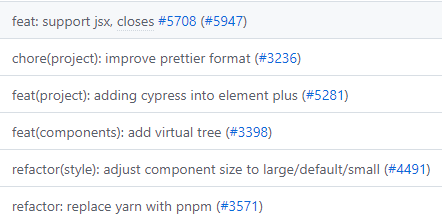
清除上一个账号信息
git config --local --unset credential.helper
git config --global --unset credential.helper
git config --system --unset credential.helper
git config --global user.name "xcxxx"
git config --global user.email "xxxxxxx@qq.com"
解决VsCode每次推送都输入密码问题,在项目所在文件夹(即在.git)执行
git config credential.helper store仓库拥有者不一致错误
提示错误信息为:detected dubious ownership in repository ...
解决办法在控制台使用以下命令解决
git config --global --add safe.directory *换行符错误
warning: in the working copy of '.gitignore', LF will be replaced by CRLF the next time Git touches it执行
git config --global core.autocrlf true区分大小写
git config --global core.ignorecase false统一换行符
项目下创建.gitattributes
# ============================================
# 基础设置:所有文本文件默认使用 LF
# ============================================
* text=auto eol=lf

# ============================================
# 前端相关文件
# ============================================
# Vue/React/Angular
*.js text eol=lf
*.jsx text eol=lf
*.ts text eol=lf
*.tsx text eol=lf
*.vue text eol=lf
*.svelte text eol=lf

# 样式文件
*.css text eol=lf
*.scss text eol=lf
*.sass text eol=lf
*.less text eol=lf

# HTML/模板
*.html text eol=lf
*.htm text eol=lf
*.tpl text eol=lf

# 配置文件
*.json text eol=lf
*.xml text eol=lf
*.yaml text eol=lf
*.yml text eol=lf
*.toml text eol=lf

# 包管理器
*.lock text eol=lf
package-lock.json text eol=lf
yarn.lock text eol=lf
pnpm-lock.yaml text eol=lf

# ============================================
# 后端相关文件(Java/Spring Boot)
# ============================================
# Java 源码
*.java text eol=lf
*.groovy text eol=lf
*.kt text eol=lf
*.kts text eol=lf

# Maven
pom.xml text eol=lf
*.gradle text eol=lf
*.gradle.kts text eol=lf
gradle.properties text eol=lf
settings.gradle text eol=lf
/mvnw text eol=lf
/gradlew text eol=lf

# Spring Boot 配置
application.properties text eol=lf
application.yml text eol=lf
application-*.yml text eol=lf
bootstrap.yml text eol=lf

# ============================================
# Python/Django/Flask
# ============================================
*.py text eol=lf
*.pyi text eol=lf
requirements.txt text eol=lf
Pipfile text eol=lf
Pipfile.lock text eol=lf

# ============================================
# Go
# ============================================
*.go text eol=lf
go.mod text eol=lf
go.sum text eol=lf

# ============================================
# 数据库/SQL
# ============================================
*.sql text eol=lf
*.psql text eol=lf

# ============================================
# 脚本文件(必须 LF)
# ============================================
*.sh text eol=lf
*.bash text eol=lf
*.zsh text eol=lf
*.fish text eol=lf
*.ps1 text eol=lf

# ============================================
# Windows 脚本(必须 CRLF)
# ============================================
*.bat text eol=crlf
*.cmd text eol=crlf
*.ps1 text eol=crlf

# ============================================
# 文档文件
# ============================================
*.md text eol=lf
*.markdown text eol=lf
*.txt text eol=lf
*.adoc text eol=lf
*.rst text eol=lf

# ============================================
# 版本控制相关
# ============================================
.gitattributes text eol=lf
.gitignore text eol=lf
.gitmodules text eol=lf
.gitkeep text eol=lf
.dockerignore text eol=lf
.eslintignore text eol=lf
.prettierignore text eol=lf

# ============================================
# CI/CD 配置
# ============================================
Jenkinsfile text eol=lf
Dockerfile text eol=lf
docker-compose*.yml text eol=lf
.github/** text eol=lf
.gitlab-ci.yml text eol=lf
.travis.yml text eol=lf
.woodpecker.yml text eol=lf

# ============================================
# 编辑器配置
# ============================================
.editorconfig text eol=lf
.vscode/** text eol=lf
.idea/** text eol=lf
*.code-workspace text eol=lf

# ============================================
# 二进制文件(不转换)
# ============================================
*.png binary
*.jpg binary
*.jpeg binary
*.gif binary
*.ico binary
*.svg binary
*.webp binary
*.bmp binary

*.mp4 binary
*.mp3 binary
*.wav binary
*.mov binary
*.avi binary

*.pdf binary
*.doc binary
*.docx binary
*.xls binary
*.xlsx binary
*.ppt binary
*.pptx binary

*.zip binary
*.tar binary
*.gz binary
*.7z binary
*.rar binary

*.jar binary
*.war binary
*.ear binary

*.exe binary
*.dll binary
*.so binary
*.dylib binary

# ============================================
# 日志和临时文件(通常不提交,但以防万一)
# ============================================
*.log text eol=lf
*.tmp text eol=lf
*.swp binary
*.swo binary
首次提交
# 添加 .gitattributes 文件后
git add --renormalize .
git commit -m "chore: 添加 .gitattributes"
之后操作
# 之后正常使用,不需要 --renormalize
git add .
git commit -m "feat: 新功能"
git push