依赖
npm install sm-crypto@0.4.0
原生开发需要导包操作
涉及文件
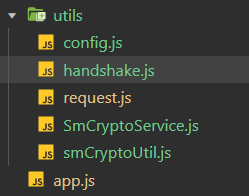
底层加解密工具
import {
  sm2,
  sm4,
  sm3
} from 'sm-crypto'

/**
 * SM2/SM3/SM4 加解密底层工具
 * 纯算法实现,不包含任何业务逻辑
 */
class SmCryptoUtil {

  /**
   * SM3 哈希计算
   * @param {string} data - 待哈希的数据
   * @returns {string} 哈希值(十六进制)
   */
  static sm3Hash(data) {
    try {
      return sm3(data)
    } catch (error) {
      console.error('SM3 哈希失败:', error)
      throw new Error('SM3 哈希失败: ' + error.message)
    }
  }

  /**
   * 生成 SM2 密钥对
   * @returns {Object} { publicKey, privateKey }
   */
  static generateSm2KeyPair() {
    try {
      const keyPair = sm2.generateKeyPairHex()
      return {
        publicKey: keyPair.publicKey,
        privateKey: keyPair.privateKey
      }
    } catch (error) {
      console.error('SM2 密钥生成失败:', error)
      throw new Error('SM2 密钥生成失败: ' + error.message)
    }
  }

  /**
   * SM2 加密
   * @param {string} plainText - 明文字符串
   * @param {string} publicKey - 公钥(十六进制)
   * @param {number} cipherMode - 加密模式,1: C1C3C2, 0: C1C2C3
   * @returns {string} 密文(十六进制,包含 04 前缀)
   */
  static sm2Encrypt(plainText, publicKey, cipherMode = 1) {
    try {
      // sm-crypto 的 doEncrypt 会去掉 04 前缀,这里补回来
      return '04' + sm2.doEncrypt(plainText, publicKey, cipherMode)
    } catch (error) {
      console.error('SM2 加密失败:', error)
      throw new Error('SM2 加密失败: ' + error.message)
    }
  }

  /**
   * SM2 解密
   * @param {string} cipherText - 密文(十六进制,可能包含 04 前缀)
   * @param {string} privateKey - 私钥(十六进制)
   * @param {number} cipherMode - 加密模式,1: C1C3C2, 0: C1C2C3
   * @returns {string} 明文字符串
   */
  static sm2Decrypt(cipherText, privateKey, cipherMode = 1) {
    try {
      const data = cipherText.startsWith('04') ? cipherText.substring(2) : cipherText
      return sm2.doDecrypt(data, privateKey, cipherMode)
    } catch (error) {
      console.error('SM2 解密失败:', error)
      throw new Error('SM2 解密失败: ' + error.message)
    }
  }

  /**
   * 生成随机 SM4 密钥(32位十六进制)
   * @returns {string} 32位十六进制字符串
   */
  static generateSm4Key() {
    const chars = '0123456789abcdef'
    let result = ''
    for (let i = 0; i < 32; i++) {
      result += chars[Math.floor(Math.random() * 16)]
    }
    return result
  }

  /**
   * 生成随机 IV(16字节 = 32位十六进制)
   * @returns {string} 32位十六进制字符串
   */
  static generateIv() {
    const bytes = new Uint8Array(16)

    // 微信小程序环境
    if (typeof wx ! 'undefined' && wx.getRandomValues) {
      wx.getRandomValues(bytes)
    } else if (typeof crypto ! 'undefined' && crypto.getRandomValues) {
      // Web 环境
      crypto.getRandomValues(bytes)
    } else {
      // 降级方案
      for (let i = 0; i < 16; i++) {
        bytes[i] = Math.floor(Math.random() * 256)
      }
    }

    let hex = ''
    for (let i = 0; i < 16; i++) {
      hex += bytes[i].toString(16).padStart(2, '0')
    }
    return hex
  }

  /**
   * SM4 CBC 加密(随机 IV 前置)
   * @param {string} plainText - 明文字符串
   * @param {string} keyHex - 32位十六进制密钥
   * @returns {string} IV(32位) + 密文(十六进制)
   */
  static sm4Encrypt(plainText, keyHex) {
    try {
      const iv = this.generateIv()
      const cipherHex = sm4.encrypt(plainText, keyHex, {
        mode: 'cbc',
        iv: iv
      })
      return iv + cipherHex
    } catch (error) {
      console.error('SM4 加密失败:', error)
      throw new Error('SM4 加密失败: ' + error.message)
    }
  }

  /**
   * SM4 CBC 解密
   * @param {string} cipherHex - IV(32位) + 密文(十六进制)
   * @param {string} keyHex - 32位十六进制密钥
   * @returns {string} 明文字符串
   */
  static sm4Decrypt(cipherHex, keyHex) {
    try {
      const iv = cipherHex.substring(0, 32)
      const data = cipherHex.substring(32)
      return sm4.decrypt(data, keyHex, {
        mode: 'cbc',
        iv: iv
      })
    } catch (error) {
      console.error('SM4 解密失败:', error)
      throw new Error('SM4 解密失败: ' + error.message)
    }
  }
}

export default SmCryptoUtil
加解密服务层
import SmCryptoUtil from './smCryptoUtil'

/**
 * 生成 19 位数字指纹
 * 结构:时间戳(13位) + 随机数(4位) + 校验位(2位)
 * @returns {string} 19位数字字符串
 */
export function generateFingerprint() {
  const timestamp = String(Date.now()).padStart(13, '0')
  const rand = String(1000 + Math.floor(Math.random() * 9000))
  const prefix = timestamp + rand
  return prefix + calcChecksum(prefix)
}

/**
 * 校验和算法:交替权重 1 和 3,生成 2 位校验码
 */
function calcChecksum(str) {
  let sum = 0
  for (let i = 0; i < str.length; i++) {
    const digit = parseInt(str.charAt(i))
    sum += digit * ((i % 2 = 0) ? 1 : 3)
  }
  const check1 = (10 - (sum % 10)) % 10
  const check2 = Math.floor(sum / 10) % 10
  return String(check2) + String(check1)
}

//  SM3 签名

/**
 * SM3 签名
 * 签名公式:SM3(sm3Salt + timestamp + "." + fingerprint + "." + body + sm3Salt)
 */
export function sm3Sign(sm3Salt, timestamp, fingerprint, body) {
  const signStr = sm3Salt + timestamp + '.' + fingerprint + '.' + body + sm3Salt
  return SmCryptoUtil.sm3Hash(signStr)
}

//  SM2 相关(直接透传底层工具)

/**
 * 生成 SM2 密钥对
 * @returns {Object} { publicKey, privateKey }
 */
export function generateSm2KeyPair() {
  return SmCryptoUtil.generateSm2KeyPair()
}

/**
 * SM2 加密
 * @param {string} plainText - 明文字符串
 * @param {string} publicKey - 公钥(十六进制)
 * @param {number} cipherMode - 加密模式,1: C1C3C2, 0: C1C2C3
 * @returns {string} 密文(十六进制,包含 04 前缀)
 */
export function sm2Encrypt(plainText, publicKey, cipherMode = 1) {
  return SmCryptoUtil.sm2Encrypt(plainText, publicKey, cipherMode)
}

/**
 * SM2 解密
 * @param {string} cipherText - 密文(十六进制,可能包含 04 前缀)
 * @param {string} privateKey - 私钥(十六进制)
 * @param {number} cipherMode - 加密模式,1: C1C3C2, 0: C1C2C3
 * @returns {string} 明文字符串
 */
export function sm2Decrypt(cipherText, privateKey, cipherMode = 1) {
  return SmCryptoUtil.sm2Decrypt(cipherText, privateKey, cipherMode)
}

//  SM4 相关

/**
 * SM4 加密
 * @param {string} plainText - 明文字符串
 * @param {string} keyHex - 32位十六进制密钥
 * @returns {string} IV(32位) + 密文(十六进制)
 */
export function sm4Encrypt(plainText, keyHex) {
  return SmCryptoUtil.sm4Encrypt(plainText, keyHex)
}

/**
 * SM4 解密
 * @param {string} cipherHex - IV(32位) + 密文(十六进制)
 * @param {string} keyHex - 32位十六进制密钥
 * @returns {string} 明文字符串
 */
export function sm4Decrypt(cipherHex, keyHex) {
  return SmCryptoUtil.sm4Decrypt(cipherHex, keyHex)
}
请求地址配置
// utils/config.js
// 统一配置
export const BASE_URL = 'http://localhost:19982'
request.js请求工具封装
// utils/request.js
import {
  isReady,
  signRequest,
  initHandshake,
  clearSession
} from './handshake'
import { BASE_URL } from './config'

// 握手路径(白名单,不验签)
const HANDSHAKE_API = '/handshake'

// 是否正在重新握手(防止并发握手)
let rehandshaking = null

const request = (options = {}) => {
  const defaultConfig = {
    url: '',
    data: {},
    method: 'POST',
    timeout: 60000,
    showLoading: false,
    loadingText: '加载中...',
    showErrorToast: true
  }

  const config = { ...defaultConfig, ...options }

  // 拼接 URL
  const url = config.url.startsWith('http') ? config.url : BASE_URL + config.url

  return new Promise(async (resolve, reject) => {
    if (config.showLoading) {
      wx.showLoading({ title: config.loadingText, mask: true })
    }

    // 构建请求头、请求体
    const buildRequest = () => {
      const body = JSON.stringify(config.data)
      // 握手接口本身不走签名
      if (config.url = HANDSHAKE_API) {
        return {
          data: config.data,
          header: { 'Content-Type': 'application/json' }
        }
      }
      // 非握手接口:需要已完成握手
      if (!isReady()) {
        throw new Error('HANDSHAKE_REQUIRED')
      }
      const signHeaders = signRequest(body)
      return {
        data: config.data,
        header: {
          'Content-Type': 'application/json',
          'fingerprint': signHeaders.fingerprint,
          'timestamp': signHeaders.timestamp,
          'sign': signHeaders.sign
        }
      }
    }

    const doRequest = () => {
      let prepared
      try {
        prepared = buildRequest()
      } catch (err) {
        if (config.showLoading) wx.hideLoading()
        reject({ errMsg: err.message })
        return
      }

      wx.request({
        url: url,
        data: prepared.data,
        method: config.method,
        timeout: config.timeout,
        header: prepared.header,
        dataType: 'text',
        responseType: 'text',
        success: (res) => {
          if (config.showLoading) wx.hideLoading()

          try {
            const result = JSON.parse(res.data)
            // 402 表示握手过期,自动重试一次
            if (result.code = 402) {
              handleRehandshake(config, resolve, reject)
              return
            }
            resolve(result)
          } catch (error) {
            reject({ errMsg: error.message, statusCode: res.statusCode, data: res.data })
          }
        },
        fail: (err) => {
          if (config.showLoading) wx.hideLoading()
          if (config.showErrorToast) {
            wx.showToast({ title: err.errMsg || '网络请求失败', icon: 'none' })
          }
          reject(err)
        }
      })
    }

    doRequest()
  })
}

/**
 * 处理握手过期:重新握手后重试原请求
 */
async function handleRehandshake(config, resolve, reject) {
  console.log('握手已过期,重新握手...')
  clearSession()

  // 防止并发握手
  if (!rehandshaking) {
    rehandshaking = initHandshake().finally(() => {
      rehandshaking = null
    })
  }

  try {
    await rehandshaking
    // 重新发起原请求
    request(config).then(resolve).catch(reject)
  } catch (err) {
    reject({ errMsg: '重新握手失败: ' + err.message })
  }
}

export default request
握手机制
// utils/handshake.js
// 启动握手:生成 SM2 密钥对 → 发送公钥+指纹 → 换取 sm3Salt+sm4Key
import {
  generateFingerprint,
  generateSm2KeyPair,
  sm2Decrypt,
  sm3Sign
} from './SmCryptoService'
import request from './request'

// ── 会话状态(内存) ──
let session = {
  fingerprint: null,  // 19位数字指纹
  sm3Salt: null,      // SM3 盐值
  sm4Key: null        // SM4 会话密钥
}

const SM2_KEY = 'lezu_sm2_keypair'

/**
 * 加载或生成 SM2 密钥对(持久化到本地存储)
 */
function loadOrCreateKeyPair() {
  try {
    const stored = wx.getStorageSync(SM2_KEY)
    if (stored && stored.publicKey && stored.privateKey) {
      return stored
    }
  } catch (e) {
    // 读取失败,重新生成
  }

  const keyPair = generateSm2KeyPair()
  wx.setStorageSync(SM2_KEY, keyPair)
  return keyPair
}

/**
 * 执行握手:上传 SM2 公钥 + 指纹,换取 sm3Salt + sm4Key
 * 握手接口是白名单路径,request.js 内会自动跳过签名
 */
function doHandshake(sm2PublicKey, fingerprint) {
  return request({
    url: '/handshake',
    data: {
      sm2PublicKey: sm2PublicKey,
      fingerprint: fingerprint
    }
  })
}

/**
 * 初始化握手(应在 App.onLaunch 中调用一次)
 * 返回 true 表示握手成功
 */
export async function initHandshake() {
  try {
    // 1. 获取或生成 SM2 密钥对
    const keyPair = loadOrCreateKeyPair()
    console.log('SM2 密钥对已就绪')

    // 2. 每次启动重新生成指纹
    const fingerprint = generateFingerprint()

    // 3. 发送握手请求
    console.log('发起握手请求...')
    const resp = await doHandshake(keyPair.publicKey, fingerprint)
    if (resp.code ! 200 || !resp.data) {
      throw new Error(resp.msg || '握手失败')
    }
    console.log('= 握手响应(加密) =')
    console.log('sm3Salt(密文):', resp.data.sm3Salt)
    console.log('sm4Key(密文):', resp.data.sm4Key)

    // 4. 用 SM2 私钥解密 sm3Salt 和 sm4Key
    const sm3Salt = sm2Decrypt(resp.data.sm3Salt, keyPair.privateKey)
    const sm4Key = sm2Decrypt(resp.data.sm4Key, keyPair.privateKey)
    console.log('= 握手响应(解密后) =')
    console.log('sm3Salt(明文):', sm3Salt)
    console.log('sm4Key(明文):', sm4Key)
    console.log('fingerprint:', fingerprint)

    if (!sm3Salt || !sm4Key) {
      throw new Error('SM2 解密失败')
    }

    // 5. 存入内存会话
    session = { fingerprint, sm3Salt, sm4Key }
    console.log('握手完成')
    return true
  } catch (err) {
    console.error('握手失败:', err)
    session = { fingerprint: null, sm3Salt: null, sm4Key: null }
    throw err
  }
}

/**
 * 握手是否已完成
 */
export function isReady() {
  return !!(session.fingerprint && session.sm3Salt && session.sm4Key)
}

/**
 * 为请求生成签名头
 * @param {string} body - 请求体 JSON 字符串
 * @returns {{ fingerprint, timestamp, sign }}
 */
export function signRequest(body) {
  if (!isReady()) {
    throw new Error('握手未完成')
  }
  const timestamp = String(Date.now())
  const sign = sm3Sign(session.sm3Salt, timestamp, session.fingerprint, body)
  return {
    fingerprint: session.fingerprint,
    timestamp: timestamp,
    sign: sign
  }
}

/**
 * 清除会话(握手过期时调用)
 */
export function clearSession() {
  session = { fingerprint: null, sm3Salt: null, sm4Key: null }
}
app启动握手
// app.js
import { initHandshake } from './utils/handshake'

App({
  globalData: {
    userInfo: null
  },

  async onLaunch() {
    console.log('App 启动,开始安全握手...')
    try {
      await initHandshake()
      console.log('安全握手完成,会话已建立')
    } catch (err) {
      console.error('握手失败:', err)
      wx.showToast({
        title: '初始化失败,请重启',
        icon: 'none'
      })
    }
  }
})