Redis特点和优势
- 内存数据库,速度快,也支持数据的持久化,可以将内存中的数据保存在磁盘中,重启的时候可以再次加载进行使用
- Redis不仅仅支持简单的key-value类型的数据,同时还提供list,set,zset,hash等数据结构的存储
- Redis支持数据的备份,即master-slave模式的数据备份
- 支持事务
Redis作用
- 缓存
- 分布式锁
- 队列:Redis支持列表数据类型,可以将消息存储在列表中,并且支持阻塞式操作,可以实现消息队列的等待和通知机制
- 计数器
- 购物车
- 抽奖
- 排行榜
Redis安装
到官方网站下载tar压缩包,上传到服务器进行解压
推荐下载源码包:https://download.redis.io/releases/redis-7.4.0.tar.gz,然后自行编译,适用于所有平台
tar -zxvf redis.xxx
# 需要gcc编译
# yum install gcc
# yum install make
make install
然后复制解压目录下的redis.conf到/usr/local/bin/redis.xx/(安装目录下,不同系统可能有差别),然后编辑
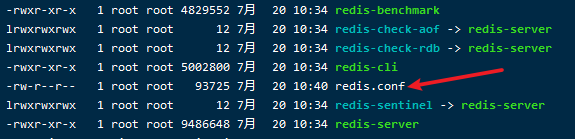
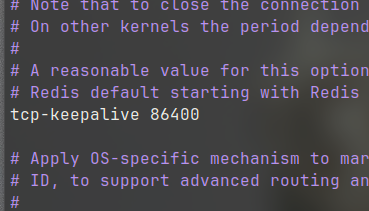
开启后台运行

默认端口

用配置文件启动Redis
redis-server ./redis.conf
查看端口是否正常启动
netstat -ntulp | grep 6379
连接测试
redis-cli -h localhost -p 6379
配置
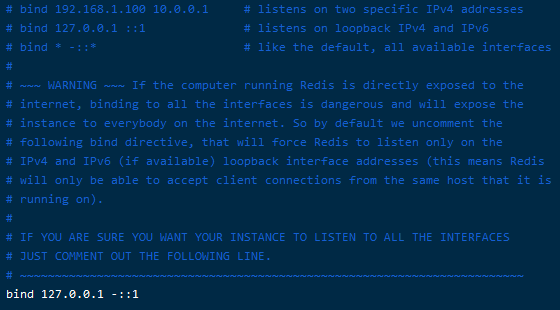
开启远程连接,注释掉以下代码
密码配置
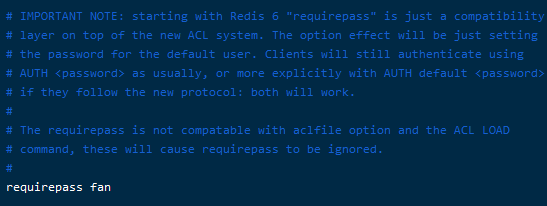
连接后使用auth password验证身份
连接工具
Redis为何快
Redis将所有的数据都放在内存中,使用单线程去操作,多线程有上下文切换(耗时)
开机自启
centos
startRedis.sh
/usr/local/bin/redis-server /usr/local/bin/redis.conf

vim /etc/rc.d/rc.local
/usr/local/bin/startRedis.sh

chmod +x /usr/local/bin/startRedis.sh
启动报错
[root@10 ~]# /usr/local/bin/redis-server /usr/local/bin/redis.conf
2623:C 28 Sep 2024 13:27:43.484 # WARNING Memory overcommit must be enabled! Without it, a background save or replication may fail under low memory condition. Being disabled, it can also cause failures without low memory condition, see https://github.com/jemalloc/jemalloc/issues/1328. To fix this issue add 'vm.overcommit_memory = 1' to /etc/sysctl.conf and then reboot or run the command 'sysctl vm.overcommit_memory=1' for this to take effect.
[root@10 ~]#
echo "1" > /proc/sys/vm/overcommit_memory
出现启动没有响应问题,设置日志文件后,发现提示报错
# Failed to configure LOCALE for invalid locale name.
出现这个问题是由于系统没有正确设置locale环境, 而locale是用于设置本地环境的比如:语言、时区、数字等
解决方案:设置系统环境变量
echo "export LC_ALL=en_US.UTF-8"  >>  /etc/profile
source /etc/profile
windows安装
https://github.com/tporadowski/redis/releases:同理配置后启动
redis-server.exe redis.windows.conf
ubuntu安装
# 官网下载或上传包
wget http://download.redis.io/releases/redis-7.4.0.tar.gz
tar -zxvf redis-7.4.0.tar.gz
sudo apt install build-essential tcl
sudo make install
redis-server --version
配置文件然后启动,不需要放到其他地方
redis-server redis.conf
远程访问需要设置密码才行,记得开防火墙
# 查看已开放端口
firewall-cmd --list-all
# 开放端口
firewall-cmd --zone=public --add-port=6379/tcp --permanent
# 重启生效
firewall-cmd --reload
查看
netstat -ntulp | grep 6379
ubuntu开机执行脚本
创建service文件vim /etc/systemd/system/redisStart.service,加上脚本位置
[Unit]
Description=Run a script on startup

[Service]
ExecStart=/usr/redis-7.4.0/startRedis.sh # 脚本位置
Type=oneshot
RemainAfterExit=yes

[Install]
WantedBy=multi-user.target
创建启动脚本
#!/bin/bash
redis-server /usr/redis-7.4.0/redis.conf
执行
# 加可执行
chmod +x startRedis.sh
# 状态
systemctl status redisStart.service
# 开启
systemctl enable redisStart.service
# 执行
systemctl restart redisStart.service
# 重启
systemctl restart redisStart.service
# 重新加载配置
systemctl daemon-reload
连接超时设置
redis-cli
auth password
config set timeout 0