
调整导航hover
// 导航背景
.menu-item {
  padding: 0 10px;
}
.menu-item a {
  border-radius: 3px;
  padding: 5px 10px !important;
}
增加背景图片
body {
  // 字体调整
  font-family: Helvetica, 'PingFang SC', 'Hiragino Sans GB', 'Microsoft YaHei', '微软雅黑', Arial, sans-serif;
  // 防止页面因没有滚动条导致的右移现象
  min-height: 100.1vh;

  background-image: url("/images/20260429104201.svg");
  background-position: center center;
  background-repeat: no-repeat;
  background-size: cover;
  background-attachment: fixed;
}
左中右布局
编辑layout/_layout.njk
<!DOCTYPE html>
<html lang="{{ page.lang }}">
<head>
  {{ partial('_partials/head/head.njk', {}, {cache: theme.cache.enable}) }}
  {%- include '_partials/head/head-unique.njk' -%}
  <title>{% block title %}{% endblock %}</title>
  {{ partial('_third-party/analytics/index.njk', {}, {cache: theme.cache.enable}) }}
  {{ partial('_scripts/index.njk', {}, {cache: theme.cache.enable}) }}
  {{ partial('_third-party/index.njk', {}, {cache: theme.cache.enable}) }}
  {{ partial('_third-party/statistics/index.njk', {}, {cache: theme.cache.enable}) }}
  {%- include '_third-party/math/index.njk' -%}
  {%- include '_third-party/quicklink.njk' -%}
  {{- next_inject('head') }}
  <noscript>
    <link rel="stylesheet" href="{{ url_for(theme.css) }}/noscript.css">
  </noscript>
</head>

<body itemscope itemtype="http://schema.org/WebPage"{% if theme.motion.enable %} class="use-motion"{% endif %}>
  <div class="headband"></div>

  <main class="main">
    <div class="column">
      <header class="header" itemscope itemtype="http://schema.org/WPHeader">
        {%- include '_partials/header/index.njk' -%}
      </header>

      {# 自定义分类 #}
      <div class="header-inner myCate sidebar animated fadeInUp">{% include '_partials/page/categoriesCustom.njk' %}</div>


    </div>

    <div class="main-inner {% block class %}{% endblock %}">
      {%- include '_partials/header/sub-menu.njk' -%}
      {% block content %}{% endblock %}
      {%- include '_partials/comments.njk' -%}
    </div>

    <div class="column">
      {%- if theme.sidebar.display ! 'remove' %}
        {% block sidebar %}{% endblock %}
      {%- endif %}
    </div>
  </main>

  <footer class="footer">
    <div class="footer-inner">
      {%- include '_partials/languages.njk' -%}
      {{ partial('_partials/footer.njk', {}, {cache: theme.cache.enable}) }}
    </div>
  </footer>

  {{ partial('_partials/widgets.njk', {}, {cache: theme.cache.enable}) }}

  {{- next_inject('bodyEnd') }}
</body>
</html>
页面宽度调整为1400px,加上中间宽度计算css
// 左中右布局
.main-inner {
    width: calc(100% - 504px);
}
侧边标签改运行天数
因为使用不到标签,同时不想为文章加标签,也从来没有通过标签查找过文章,所以将侧边标签改为了运行天数展示
首先将文件layout/_partials/sidebar/site-overview.njk中的以下代码:
{%- if site.tags.length > 0 %}
  {%- set tagsPageQuery = site.pages.find({type: 'tags'}, {lean: true}) %}
  {%- set hasTagsPage = tagsPageQuery.length > 0 %}
  <div class="site-state-item site-state-tags">
    {%- set tag_dir = theme.menu.tags.split('||')[0] | trim if theme.menu.tags else config.tag_dir + '/' %}
    {%- if hasTagsPage %}
      <a href="{{ url_for(tag_dir) }}">
    {%- endif %}
    <span class="site-state-item-count">{{ site.tags.length }}</span>
    <span class="site-state-item-name">{{ __('state.tags') }}</span>
    {%- if hasTagsPage %}</a>{% endif %}
  </div>
{%- endif %}
替换为:
<div class="site-state-item site-state-tags">
  <span class="site-state-item-count run-days">0</span>
  <span class="site-state-item-name">运行</span>
</div>
然后在文件layout/_layout.njk中body结束前加上以下代码:
<script type="text/javascript">
  // 运行时长
  let timer = new Date().getTime() - Date.parse('2026-04-28 00:00:00')
  document.querySelector('.run-days').innerHTML = parseInt(timer / 1000 / 60 / 60 / 24)
</script>
美化代办事项样式
- 自定义代办列表样式(去掉小黑点,重新加方框样式)
- 美化浏览器滚动条(第三方插件)
- 测试加密方式是否安全(能否从页面获取到所有内容)
- 固定彩带背景
/* 代办事项 */
.main-inner input {
  position: relative;
  top: 1px;
}
.main-inner input[type="checkbox"] {
  position: relative;
  width: 14px;
  height: 14px;
  font-size: 14px;
  margin-right: 4px;
}
.main-inner input[type="checkbox"]::after {
  position: absolute;
  top: -1px;
  background-color: white;
  color: #000;
  width: 16px;
  height: 16px;
  display: inline-block;
  visibility: visible;
  padding-left: 0;
  text-align: center;
  content: " ";
  box-sizing: border-box;
  border: 1px solid #ccc;
  border-radius: 2px;
}
ul {
  list-style: none;
  padding-left: 28px;
}
/* 仅为不含 input 的 li 手动添加黑点(模拟默认样式) */
ul li:not(:has(input))::before {
  content: "";
  display: inline-block;
  width: 5px;
  height: 5px;
  vertical-align: middle;
  background-color: #333;
  margin-right: 12px;
  border-radius: 40px;
  margin-left: 8px;
}
.main-inner input[type="checkbox"]:checked::before {
  content: "✓";
  font-size: 12px;
  font-weight: bold;
  color: #7459ee;
  position: absolute;
  display: inline-block;
  z-index: 10;
  top: 1px;
  left: 4px;
}
ol {
  padding-left: 62px;
}
ol ol {
  padding-left: 28px;
}
标题美化
// 标题美化
.post-body h1 a,.post-body h2 a, {
  display: none;
}
/* 1级标题 */
.post-body h1 {
  font-size: 1.4em !important;
  padding-top: 10px !important;
  border-bottom: 1px solid #eee !important;
  padding-bottom: 10px !important;
  line-height: 1.5 !important;
}

.post-body h1:after {
  content: "h1";
  color: rgba(0, 0, 0, 0.2);
  font-size: 14px;
  display: inline-block;
  margin-left: 5px;
  vertical-align: top;
}

/* 2级标题 */
.post-body h2 {
  font-size: 1.2em !important;
  line-height: 1.5 !important;
}

.post-body h2:after {
  content: "h2";
  color: rgba(0, 0, 0, 0.2);
  font-size: 14px;
  display: inline-block;
  margin-left: 5px;
  vertical-align: top;
}
优化文章管理
Hexo配合VsCode写文档最麻烦的就是文章管理问题,不好做排序,而利于文章查看的也只有文件夹方式,而排序就只能选择序号
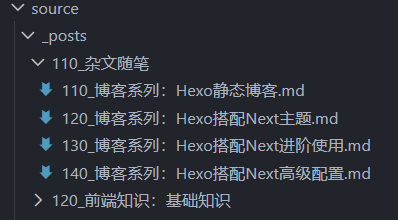
手动维护肯定是很麻烦的,所有利用Node执行js脚本完成比较方便。创建manage.js脚本,需要维护的时候执行node manage.js即可
let fs = require("fs");

function start() {
  console.log("开始执行...");
  let folderRoot = "./source/_posts";
  // 读取文件夹
  let folderList = fs.readdirSync(folderRoot);
  // 序号
  let sort = 110;
  // 遍历
  for (const item of folderList) {
    console.log(item);
    let newName = sort + item.substring(3, item.length);
    // 文件夹重命名
    if (item.substring(0, 3) != sort) {
      console.log("重命名文件夹:" + item + " -> " + newName);
      fs.renameSync(folderRoot + "/" + item, folderRoot + "/" + newName);
    }

    // 读取文件
    let fileList = fs.readdirSync(folderRoot + "/" + newName);
    let fileSort = 110;
    for (const file of fileList) {
      console.log(file);
      let newFileName = fileSort + file.substring(3, file.length);
      if (file.substring(0, 3) != fileSort) {
        console.log("重命名文件:" + file + " -> " + newFileName);
        fs.renameSync(
          folderRoot + "/" + newName + "/" + file,
          folderRoot + "/" + newName + "/" + newFileName,
        );
      }
      // 更新文件内容
      let fileContent = readFile(
        folderRoot + "/" + newName + "/" + newFileName,
      );
      let fileContentLine = fileContent.split("\n");
      fileContentLine[1] = "title: " + file.substring(4, file.length - 3);
      fileContentLine[2] = "categories: " + newName;
      fileContentLine[3] = "sort: " + fileSort;
      fileContent = fileContentLine.join("\n");
      writeFile(folderRoot + "/" + newName + "/" + newFileName, fileContent);
      fileSort += 10;
    }

    sort += 10;
  }

  console.log("执行完毕...");
}

/**
 * 读取数据
 */
function readFile(path) {
  try {
    return fs.readFileSync(path, { encoding: "utf-8" });
  } catch (e) {
    return "";
  }
}

/**
 * 写入数据
 */
function writeFile(path, content) {
  fs.writeFileSync(path, content);
}

// 执行
start();
注意:使用过程中需要强烈注意文件夹和文件的命名风格为110_xxx,否则不会执行,从110开始每次加10是给后面重命名和排序留缓冲,可以将某个文件改到指定位置后执行脚本修复
取消分类序号
由于使用了序号给分类和文章进行排序,在页面展示是多余的,需要去除,在layout/_partials/post/post-meta.njk中给加class名category-head-item
<span itemprop="about" itemscope itemtype="http://schema.org/Thing">
  <a href="{{ url_for(cat.path) }}" itemprop="url" rel="index"><span class="category-head-item" itemprop="name">{{ cat.name }}</span></a>
</span>
然后在layout/_layout.njk中加入处理逻辑代码,body结束前
<script type="text/javascript" data-pjax>
  // 去除分类名前的序号
  deleteSort()
  function deleteSort() {
    // 匹配3位数字加下划线的正则(例如 110_)
    const reg = /^\d{3}_/g;

    // 文章头部分类
    let allItem1 = document.querySelectorAll('.main .category-head-item')
    for (let item of allItem1) {
        item.textContent = item.textContent.replace(reg, '')
    }
    // 分类页面中
    let allItem2 = document.querySelectorAll('.main .category-list-link')
    for (let item of allItem2) {
        item.textContent = item.textContent.replace(reg, '')
    }
    // xxx分类下文章页
    let allItem3 = document.querySelectorAll('.main .collection-header')
    for (let item of allItem3) {
        item.textContent = item.textContent.replace(reg, '')
    }
  }
</script>